In a friendly HR office, a woman HR manager welcomes a new male employee, handing him an ID badge across a desk
Fynd ERP

Look after your people and pay them right, every month

From the offer letter to the final settlement, keep every employee record, shift, leave and payslip in one place, with payroll posting straight to your books.

The whole employee lifecycle in one module

Core HR, time, pay and growth, with self service for every employee.

Employee records

Employees, departments, positions and legal entities, with promotions, transfers and a full change history.

Onboarding and exits

Onboarding templates, confirmations and structured offboarding for every joiner and leaver.

Attendance and shifts

Attendance, rosters, shift locations and shift requests, with overtime tracked against the right rules.

Leave

Leave types and policies, comp-off, encashment, block lists and a leave ledger per employee.

Payroll

Salary structures, payroll runs, payslips, additional pay, corrections and loans in one flow.

Tax and statutory filings

Employee tax declarations and statutory filings handled as part of the payroll cycle.

Expenses and travel

Expense claims, advances, travel requests and vehicle records with approval chains.

Performance and growth

Appraisal cycles, one-on-ones, feedback, improvement plans, skills and surveys.

Self service and helpdesk

Employees see payslips, apply for leave, claim expenses and raise HR questions on their own.

Who it's for

HR, payroll, managers and employees each get the view and the controls they need.

HR head

  • Headcount, joiners and exits in one dashboard
  • Approval chains for leave, expenses and changes
  • Attrition and retention risk views

Payroll team

  • Monthly runs from draft to processed to paid
  • PF, ESI, professional tax and TDS in the run
  • Payroll posted to finance without a manual journal

Line managers

  • Approve leave, shifts and expenses for the team
  • One-on-ones, feedback and appraisals
  • Team attendance at a glance

Employees

  • Payslips and tax declarations in self service
  • Apply for leave and shift changes
  • Claim expenses and raise HR questions

See the screens your team will use

Real screens from Fynd ERP, shown with demo data for a fictional company.
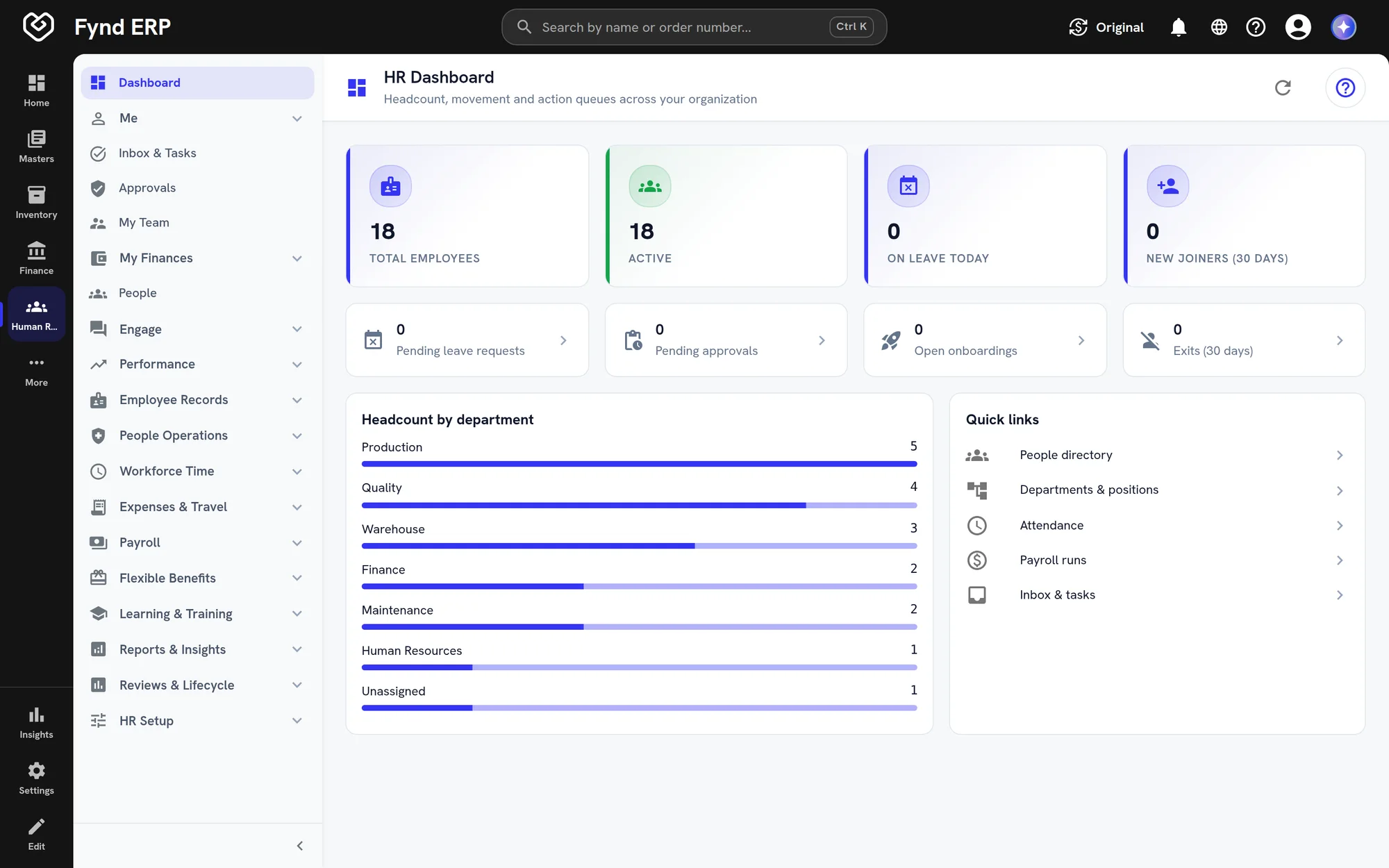
Fynd ERP HR dashboard with headcount, leave and department breakdown

Headcount, people on leave, new joiners and pending approvals in one view, with headcount by department.

  • Headcount by department
  • Pending leave and approvals
  • Quick links to people tasks
Fynd ERP HR dashboard with headcount, leave and department breakdown

A month in HR and payroll

Follow one new joiner from the accepted offer to the first salary in the ledger.

  1. Recruiting

    The offer is accepted

    An accepted offer for a machine operator hands over to HR as a new joiner.

  2. HR and Payroll

    The joiner is onboarded

    HR runs the onboarding template and sets the department, position, shift and salary structure.

  3. Learning

    Training is assigned

    Induction and safety courses are assigned to the new employee.

  4. HR and Payroll

    Attendance builds up

    Check ins, shifts, overtime and leave are recorded through the month.

  5. HR and Payroll

    Payroll is run

    The monthly run picks up attendance, loss of pay, overtime and statutory deductions.

  6. HR and Payroll

    The payslip is ready

    The employee opens the payslip in self service.

  7. Finance and Accounting

    The books are updated

    Salaries and statutory dues post to the ledger from the payroll run.

HR and payroll features in detail

The parts of HR and payroll teams ask about most.

Payroll processing

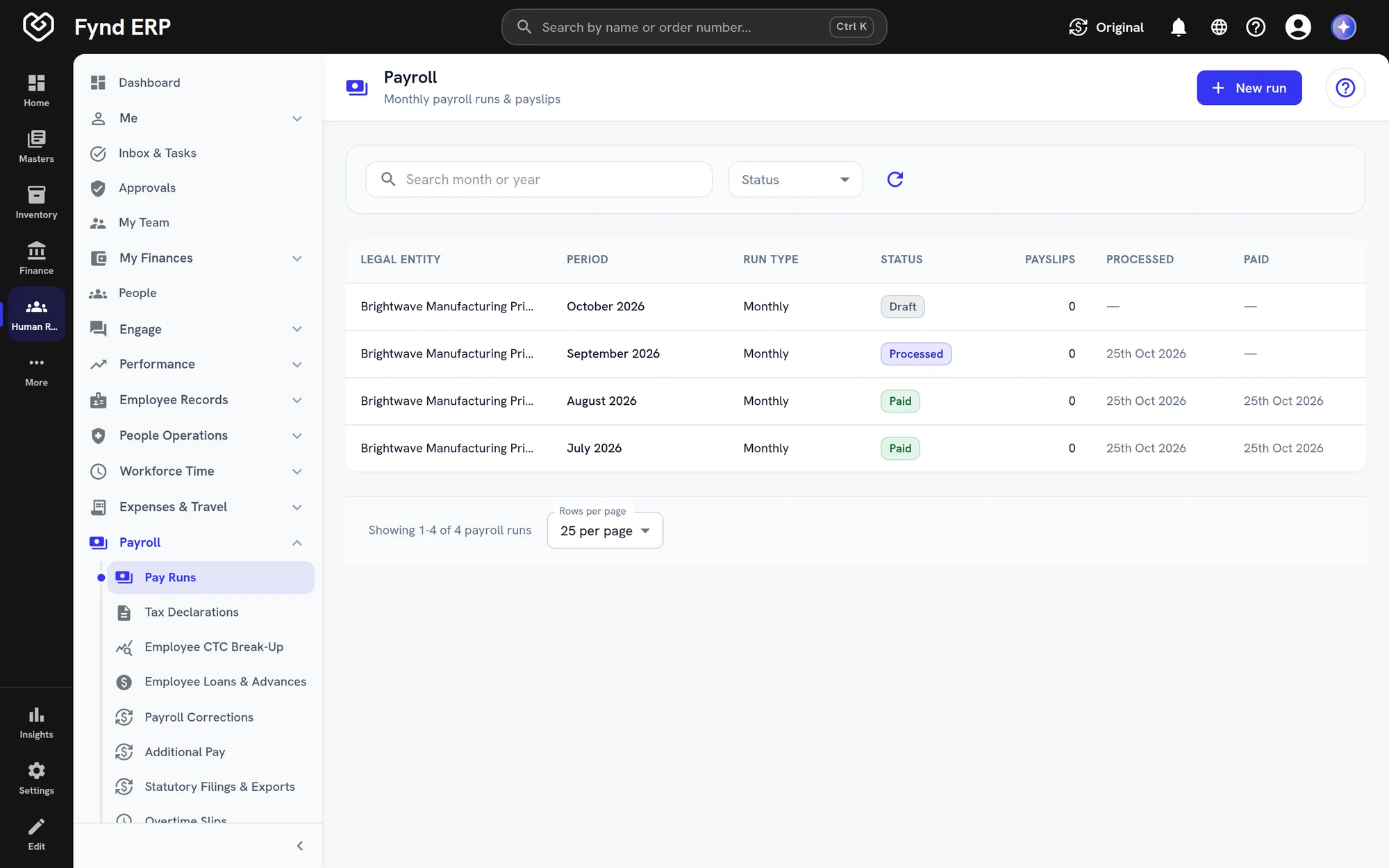
Run payroll for each legal entity and month, from draft to processed to paid, with attendance, leave and overtime pulled in. Corrections, additional pay, arrears and loans are handled in the run instead of on a spreadsheet.
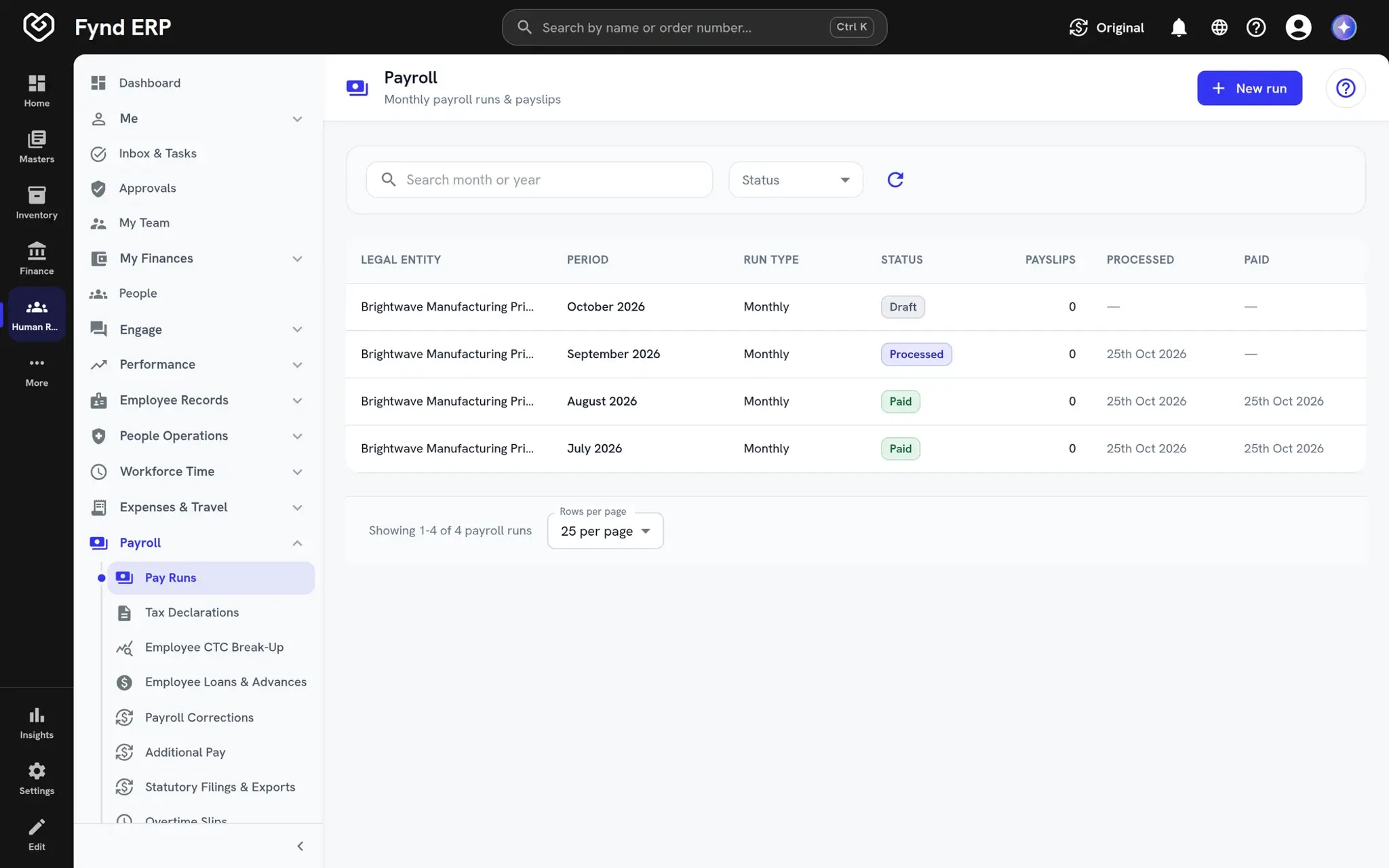
  • Salary structures and CTC breakup per employee
  • Off-cycle runs, corrections and arrears
  • Payslips for every employee in self service
Fynd ERP payroll runs list showing monthly runs with their status

PF, ESI and TDS compliance

Provident fund, ESI, professional tax, labour welfare fund and TDS are worked out as part of the payroll run. Employees file tax declarations, and statutory filings come from the same records.

  • EPF ECR file from the payroll run
  • Employee tax declarations with Form 12BB
  • Statutory filings tracked per period

Attendance and leave management

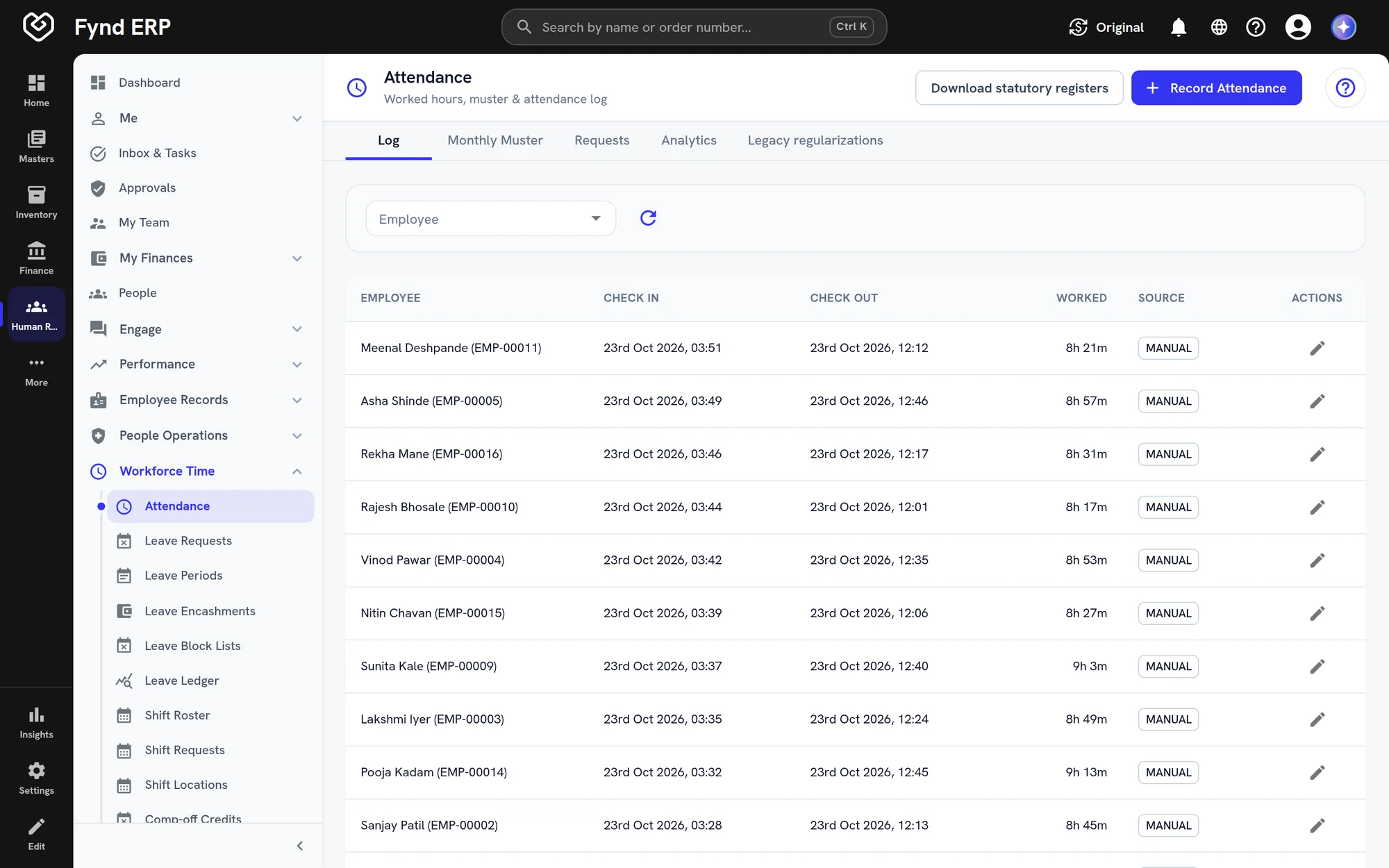
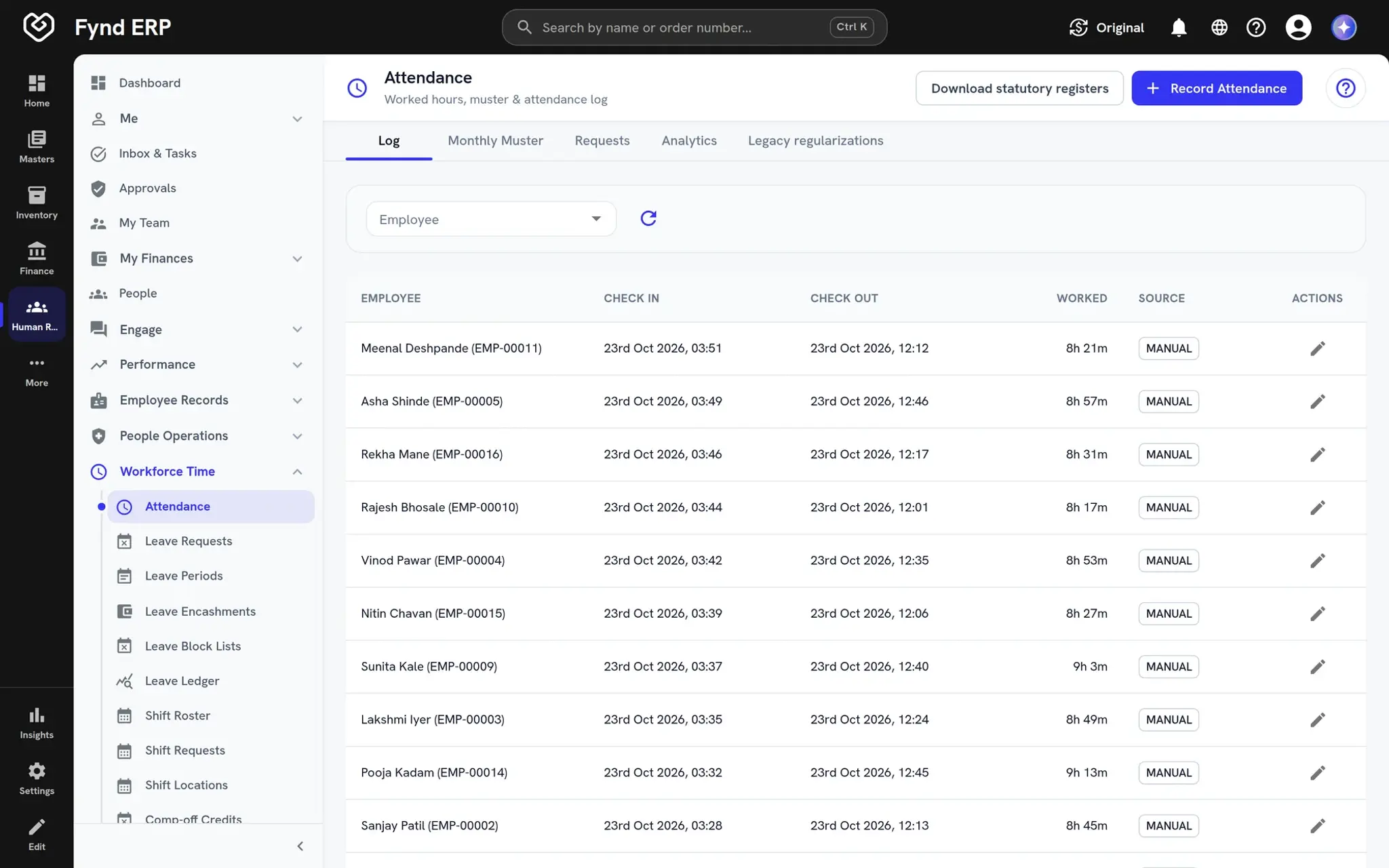
Attendance comes in with check in and check out times and hours worked, against rosters and shifts. Leave policies, comp-off, encashment and a leave ledger keep every balance traceable.
  • Rosters, shift locations and shift requests
  • Leave policies, block lists and encashment
  • Statutory registers to download
Fynd ERP attendance log with check in, check out and hours worked

Employee records and self service

Every employee has one record with department, position, legal entity and a full history of promotions and transfers. Employees see their payslips, apply for leave and claim expenses on their own.

  • Active and exited employees in one directory
  • Promotions, transfers and change history
  • Self service for leave, expenses and tax declarations

HR is wired to the rest of the business

People data is shared, not copied between systems.

Finance and Accounting

Payroll and expenses post to the right accounts without a manual journal.

Recruiting

Accepted offers hand over to HR as new joiners, with no re-keying.

Learning

Assign courses and track qualifications for the same employees.

Contract Labor

Manage your own staff and contract workers side by side.

Projects

Time logged on projects comes from the same people records.

Documents

Letters, policies and employee documents stay with each record.

Frequently asked questions

Employee records, onboarding and offboarding, attendance and shifts, leave, payroll, tax declarations and statutory filings, expenses and travel, performance, and employee self service.

Yes. Payroll and expenses post to finance inside Fynd ERP, so there is no export and import step.

Yes. Employees can see payslips, apply for leave and shifts, file tax declarations, claim expenses and raise helpdesk requests.

Yes. Employees belong to legal entities, and you can run each entity's payroll and policies separately.

Approval chains route leave, expenses and other requests to the right people, and every decision is recorded.