In a bright training room, a woman trainer guides a small group of employees working on laptops
Fynd ERP

Train every team and prove they are ready

Build courses and programs, assign them to the right people, test knowledge and hands-on skill, and keep qualifications current, even on the shop floor without a connection.

Everything your learning team needs

From the first course to a qualification that is checked on the job.

Courses and catalog

Build courses, organise them in categories and let people discover what is open to them.

Programs

Group courses into programs with an order, so people follow a clear path.

Assessments

Question banks and assessments test what people know, with attempts recorded.

Practical evaluations

Assessors check hands-on skills on the job, with their own queue and evaluation forms.

Qualifications and skills

Track qualifications and skills per person, so you know who is cleared for which work.

Sessions

Schedule classroom sessions and use check-in to record who attended.

Audiences and campaigns

Target learning to audiences and run campaigns with reminders.

Offline learning

Learners can continue on devices without a connection, and progress syncs back later.

Insights

See enrollments, completions and gaps across teams.

Who it's for

Learning teams, assessors, managers and learners each get the view they need.

Learning and development head

  • Courses, programs and campaigns in one place
  • Completions and gaps across teams
  • Audiences that target the right people

Trainers and assessors

  • Classroom sessions with check-in
  • An assessor queue for practical evaluations
  • Question banks and assessments

Plant and safety managers

  • Who holds which qualification
  • Renewals before they lapse
  • Hands-on skill checks on the floor

Learners

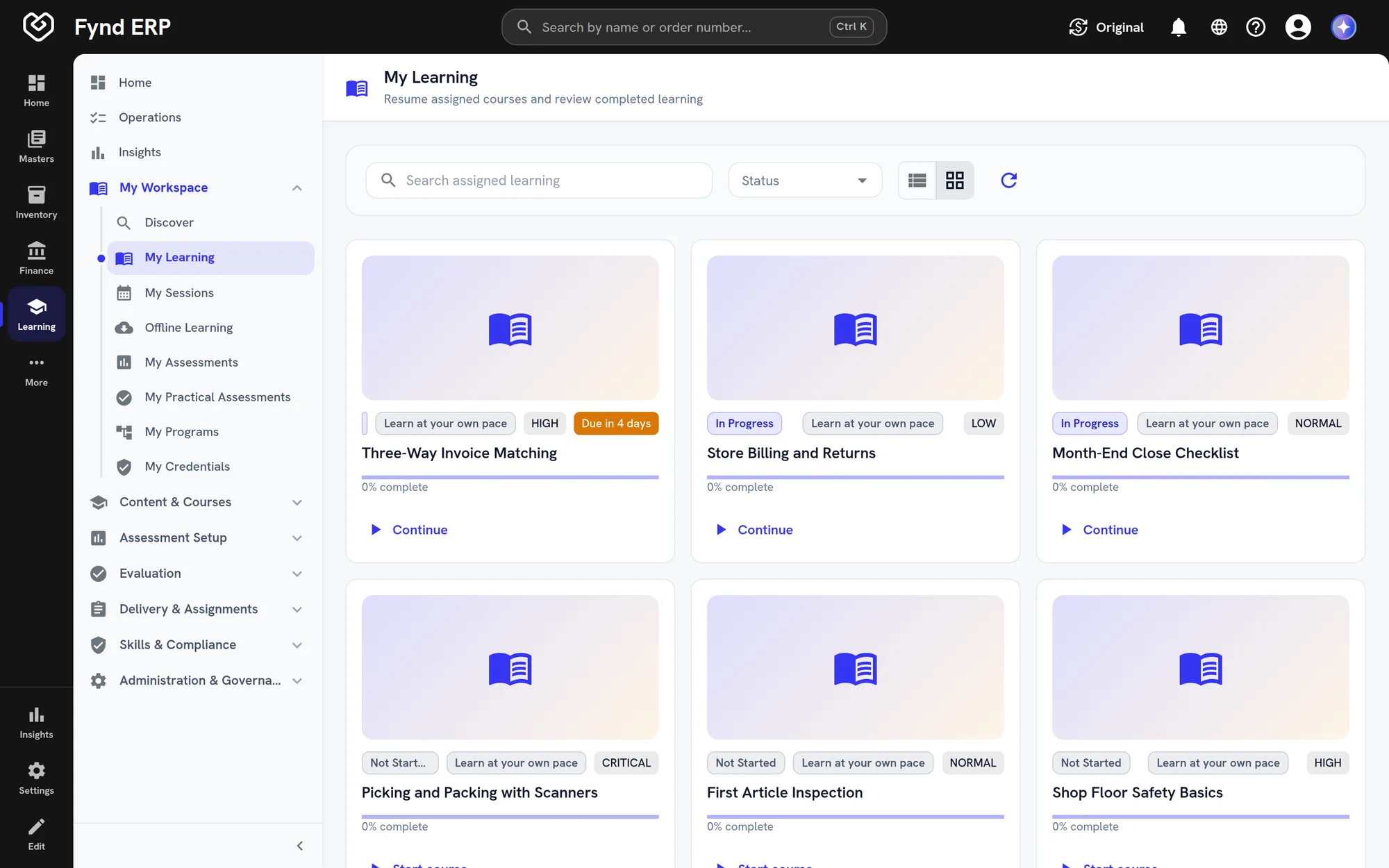
  • Assigned courses with due dates and progress
  • Discover open courses and sessions
  • Keep learning without a connection

See the screens your team will use

Real screens from Fynd ERP, shown with demo data for a fictional manufacturer.

Published courses with code, version and format, in a grid or a list.

  • Self-paced, blended and instructor-led formats
  • Versioned courses
  • Search and filter by status

A day in learning

Follow one new operator from the first day to a qualification you can rely on.

  1. HR and Payroll

    A new operator joins

    The new employee appears as a learner with the same department and role as in HR.

  2. Learning

    Training is assigned

    The induction program and a safety course are assigned with due dates.

  3. Learning

    The courses are done

    The operator works through the courses, even on a shop floor device without a connection.

  4. Learning

    Knowledge is tested

    A short assessment checks what they know, and every attempt is recorded.

  5. Learning

    Skill is checked on the job

    An assessor watches the operator at the machine and records a practical evaluation.

  6. Learning

    The qualification is granted

    The qualification is recorded with its expiry, and renewal comes up before it lapses.

  7. Reporting

    Managers see the gaps

    Completions and qualification gaps show up in reports by team.

Learning features in detail

The parts of learning management training teams ask about most.

Compliance and safety training

Assign required courses to audiences with due dates, and run campaigns with reminders until people finish. Completions and gaps show by team.

  • Audiences and assignments
  • Campaigns with reminders
  • Versioned, published courses

Assessments and question banks

Build question banks and use them in assessments that test what people know. Every attempt is recorded against the learner.

  • Reusable question banks
  • Attempts recorded per learner
  • Assessments inside programs

Practical skill evaluation

Assessors check hands-on skills where the work happens, using evaluation forms from their own queue. Results sit on the learner's record next to their courses.

  • Assessor queue
  • Evaluation forms for each skill
  • Results on the learner's record

Qualification and certification tracking

Track qualifications and skills per person, with expiry dates and renewals. You can see who is cleared for which work before you plan a shift.

  • Qualifications with expiry dates
  • Renewal before a qualification lapses
  • Skills per person

Learning is wired to your people and your work

Training records sit on the same employees and roles as the rest of the ERP.

HR and Payroll

Learners are your employees, with the same departments and roles.

Recruiting

New joiners get onboarding courses as soon as they start.

Manufacturing

Practical evaluations check shop floor skills where the work happens.

Maintenance

Keep technician qualifications current for the equipment they work on.

Customer Communications

Reminders and campaign messages go out through one channel.

Reporting

Report on completions and qualification gaps across teams.

Frequently asked questions

Courses and a catalog, programs, assessments with question banks, practical evaluations, qualifications and skills, classroom sessions, audiences and campaigns, offline learning and insights.

Yes. Offline learning lets people continue on a device without a connection, and progress syncs when they are back online.

Yes. Assessors run practical evaluations on the job and record results in their own queue.

Build audiences and assign courses, programs or campaigns to them, with reminders.

Yes. Learners are the same employees you manage in HR, so there is no separate user list to maintain.