A procurement manager reviews supplier quotes on a laptop while a colleague points to a purchase order, with a warehouse behind the glass
Fynd ERP

Buy what you need, approve it once and pay it right

From the first purchase request to the supplier payment, every step is tracked, approved and matched, and the ledger stays in step.

Everything your buying team needs

Requests, sourcing, orders, receipts and invoices in one flow, with approvals where you want them.

Requests and approvals

Teams raise purchase requests that route to the right approvers based on your policies, amounts and cost centres.

RFQs and bid scoring

Invite suppliers to quote, compare their bids side by side and score them before you award.

Purchase orders

Raise orders with payment terms and milestones, and handle changes through change orders with a full history.

Supplier management

Onboard suppliers with document templates, keep their details current and track sampling before you buy at scale.

Receipts and inbound

Track inbound shipments, receive goods against orders and raise disputes when deliveries do not match.

Invoices and matching

Capture supplier invoices, read them with OCR and match each line to the order and the goods receipt.

Payment runs

Pay suppliers in batches, manage advances, recurring payables and employee reimbursements.

Budgets and contracts

Check spend against cost centre budgets and keep supplier contracts next to the orders they cover.

Spend reports

Purchase register, payables ageing and spend analysis come straight from the transactions.

Who it's for

Each person in the buying chain gets the view and the controls they need.

Procurement head

  • One view of open requests, RFQs and orders
  • Approval rules by amount and cost centre
  • Spend by supplier, category and plant

Buyers

  • Turn accepted requests into RFQs or orders
  • Compare and score supplier quotes side by side
  • Change orders with a full history

Finance controller

  • Invoices matched to orders and receipts before payment
  • Advances, retentions and withholding handled
  • Payables and ledger update on their own

Requesters and stores

  • Raise a request in a minute and track it
  • Receive goods against the order
  • Raise a dispute when a delivery is short

See the screens your buyers will use

Real screens from Fynd ERP, shown with demo data for a fictional manufacturer.

Every order with its supplier, legal entity, value and dates in one list, with totals at the top.

  • Filter by status, date and amount
  • Open value and confirmed orders at a glance
  • Linked request and RFQ on each order

A day in procurement

Follow one purchase from the request to the ledger. Each step happens in Fynd ERP, so nothing is keyed in twice.

  1. Procurement

    A request is raised

    Maintenance asks for 40 motors for a production line, with a delivery date and cost centre.

  2. Procurement

    It is approved

    The request routes to the right approvers based on its value and cost centre.

  3. Procurement

    Suppliers quote

    The buyer sends an RFQ to three suppliers, compares their quotes and awards the best one.

  4. Procurement

    The order goes out

    A purchase order is issued to the chosen supplier with terms and delivery dates.

  5. Inventory

    Goods arrive

    Stores receive the motors against the order and the stock lands in the right location.

  6. Procurement

    The invoice is matched

    The supplier invoice is read and matched line by line to the order and the goods receipt.

  7. Finance and Accounting

    The supplier is paid

    Payment goes out in the next payment run, and payables and the ledger update.

Procurement features in detail

The parts of procurement teams ask about most.

Purchase requisition approvals

Teams raise purchase requests with items, quantities, cost centre and delivery date. Each request follows your approval policy, so the right people sign off before money is committed.

  • Approval rules by amount and cost centre
  • Pending and accepted requests in one list
  • Raise an RFQ or a purchase order from an accepted request

RFQ and supplier quotes

Invite suppliers to quote on a request, collect their bids and compare them side by side. Score quotes, send counter offers and award the order to the best bid.

  • Invite several suppliers to one RFQ
  • Side by side comparison and scoring
  • Counter offers and awards with a record of why

Three-way match

Every supplier invoice is checked against the purchase order and the goods receipt before it can be paid. Quantity or price differences are held for review instead of slipping through.

  • Invoice capture with OCR
  • Line by line match to order and receipt
  • Holds, releases and disputes with a full trail

Vendor management

Onboard suppliers with document templates, keep tax and bank details current and track sampling before you buy at scale. Every order, receipt and invoice stays linked to the supplier.
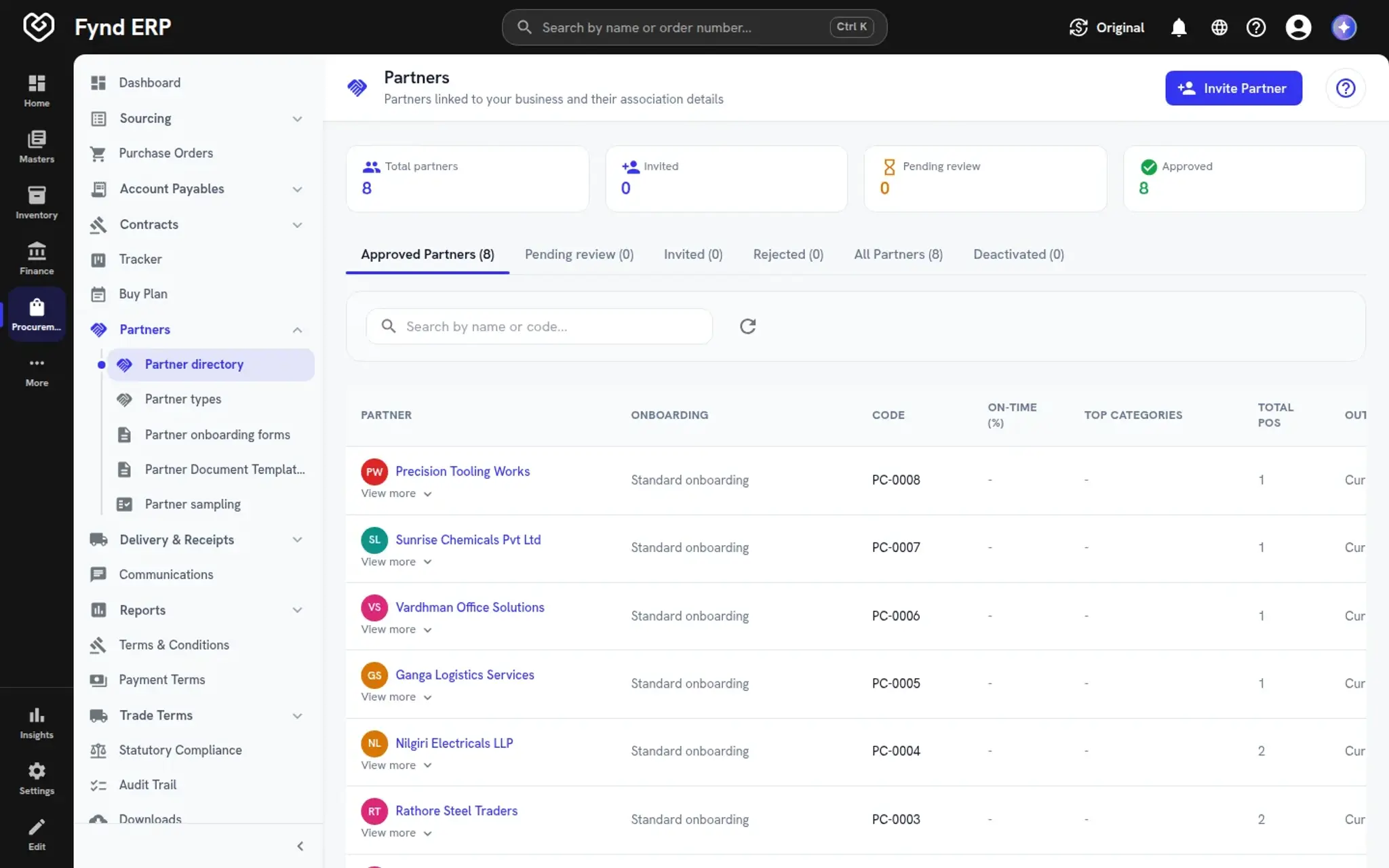
  • Onboarding with required documents
  • Tax registration and bank details on file
  • Sampling and supplier history in one place
Fynd ERP partner directory with approved suppliers, onboarding type and purchase order counts

Procurement is wired to the rest of the business

Orders, receipts and invoices update the modules that depend on them, without exports.

Finance and Accounting

Matched supplier invoices, advances and payment runs post to payables and the ledger.

Inventory

Goods receipts add stock to the right location with lots and valuation.

Warehouse Management

Inbound shipments and receipts flow into putaway in the warehouse.

Manufacturing

Buy plans turn material needs into purchase requests.

Reporting

Purchase register, payables ageing and spend analysis read the same records.

Workflow and Automation

Approvals and procurement events can start workflows and webhooks.

New

New in procurement

Recently added to this module.

  • Email-first supplier experience

    Suppliers respond to requests and orders from a secure email link, without a portal login.

  • Order straight from an accepted quote

    Raise a purchase order directly from an accepted request, with delivery dates and lines open to edit.

Frequently asked questions

Purchase requests with approvals, RFQs and bid scoring, purchase orders, supplier onboarding, goods receipts, invoice capture and matching, payment runs, budgets, contracts and spend reports.

Yes. Suppliers can be onboarded with document templates and use a partner portal to respond to your requests and orders.

Each supplier invoice line is matched to its purchase order and goods receipt. Mismatches are held for review before the invoice goes for payment.

Yes. It is the same system, so approved invoices, advances and payment runs post to payables and the general ledger without an export step.

Yes. Requests and orders carry cost centres, and you can check them against budgets before they are approved.