November 12, 2026
Loyalty programme migration: a retailer’s guide
Plan a loyalty programme migration with a practical checklist for customer data, points, POS and ecommerce testing, cutover and post-launch checks.
Amrita Bhambhani
November 12, 2026
Plan a loyalty programme migration with a practical checklist for customer data, points, POS and ecommerce testing, cutover and post-launch checks.
Amrita Bhambhani
A loyalty programme rewards customers for shopping regularly with a retailer, usually through points, membership tiers or vouchers. These programmes often run across store tills, ecommerce websites and mobile apps, with each channel accessing the same customer account.
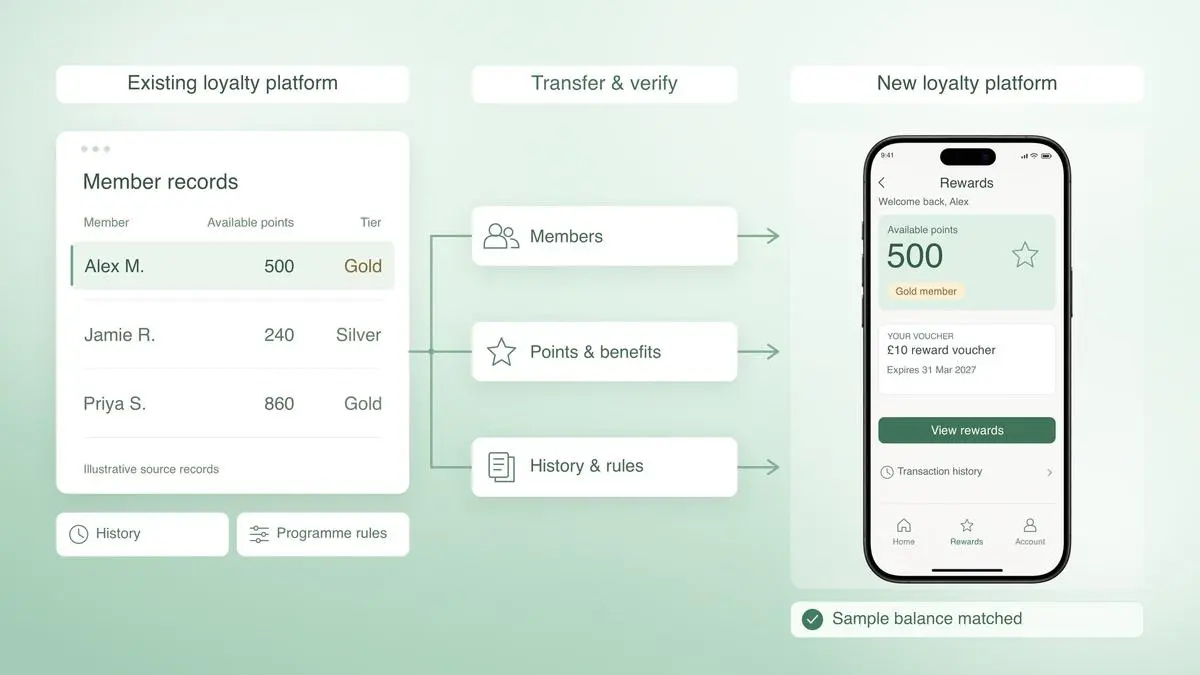
A loyalty programme migration involves transferring member accounts, points balances, transaction histories and programme rules to a new platform. Customers should be able to continue using their existing benefits without disruption. However, transactions made during the changeover, including redemptions, returns and cancellations, need to be accounted for to prevent incorrect balances, duplicate accounts or problems at checkout.
This article explains how to manage a loyalty programme migration when changing platforms, upgrading POS systems or connecting loyalty with ecommerce. It covers the data to transfer, how to manage transactions during the changeover and the checks needed before and after launch. A three-stage checklist takes retailers through preparation, cutover and post-launch verification, including how to maintain accurate member records and resolve discrepancies.
A loyalty programme migration involves transferring customer accounts, points balances, transaction histories and programme rules from an existing system to a new one. It also includes updating the connections that allow customers to earn and redeem points across stores, ecommerce websites and mobile apps.
The new system must recognise existing members, calculate points correctly and apply the same rules across every channel of the omnichannel loyalty programme. Retailers also need to test how loyalty works with their POS systems, customer service processes and financial records to ensure transactions are recorded accurately.
Some software providers use the US spelling, “loyalty program migration”, in their documentation. Both terms refer to the same process, which requires a clearly defined source of truth for each customer's balance and transaction history.
Loyalty data migration covers the transfer of customer accounts, points balances, transaction histories and programme rules to a new platform. Before moving the data, retailers need to establish what the new system will need at launch and what can be kept in an archive for customer service, audits or reporting.
They also need to confirm which system holds the correct record for each balance and transaction during the changeover. Check personal data for accuracy and transfer only what the programme needs, in line with the Information Commissioner's Office (ICO) guidance on data minimisation and accuracy.
The following table covers the seven data groups to review and the checks required for each.
Data group | What to transfer | How to verify |
Member identity | Existing and new member IDs, account status, duplicate and merged accounts | Compare member counts and check that customers can sign in and access the correct accounts |
Contact details and preferences | Email addresses, mobile numbers, communication preferences and relevant consent records | Check that details and preferences remain linked to the correct member |
Points and balances | Available points, tier-qualifying points, vouchers, credits and other loyalty currencies | Compare balances for individual members and total balances for each currency. Investigate any differences |
Points expiry | Dates points were earned, amounts, expiry dates and tier qualification periods | Check that points expire and are redeemed according to the programme rules |
Transaction history | Points earned, adjustments, redemptions, cancellations, returns and reversals | Follow selected transactions from the old system to the new one and check the resulting balances |
Programme rules | Earning rates, eligible purchases, exclusions, membership tiers, reward catalogue and redemption conditions | Use test transactions to check that the new platform applies the correct rules |
Pending transactions | Points awaiting confirmation, reserved points, outstanding redemptions and open returns | Confirm how each pending transaction will be handled during cutover and which system is responsible |
Loyalty platforms can record the same transaction differently. Some separate points that customers can spend immediately from points reserved for a pending purchase or redemption.
For example, Salesforce Loyalty Management records changes to both a member's points balance and escrow points balance. When moving to or from a system with this setup, retailers need to identify the corresponding fields and check how reserved points are released, deducted or returned.
Retailers can transfer the full transaction history or move current balances and account details while retaining older records in an accessible archive. This decision should account for the information customer service and finance teams need to answer queries, review adjustments and reconcile accounts.
If the new platform holds only part of the history, verify each member's opening balance against the existing system. Retain the original records and reconciliation results so that teams can trace where a balance came from and investigate any differences after launch.
A loyalty programme migration has three stages: preparation, cutover and post-launch verification. Each stage covers the work needed to transfer customer accounts, manage transactions during the changeover and check that the new platform works correctly.
Assign someone to each task, record the results and agree which problems must be resolved before launch. The owners below are suggested roles and can be adjusted to suit your team.
Stage 1: Preparation
Before moving any data, review how the current loyalty programme works, identify what needs to be transferred and decide how the switch will take place.
Identify the systems and teams involved
List all stores, POS terminals, ecommerce websites, mobile apps and other systems connected to the loyalty programme. Confirm which teams are responsible for customer data, loyalty rules, transactions, finance and customer support.
Completion check: Every affected system and responsibility has an assigned owner.
Owner: Project manager
Evidence: List of systems and team responsibilities
Decide what data needs to move
Identify the customer accounts, points balances, transaction histories and programme settings needed in the new platform. Match each field in the old system to the corresponding field in the new one. Decide how to handle records with missing or incorrect information.
Completion check: Required data is mapped, with a process for handling incomplete records.
Owner: Data migration lead
Evidence: Data mapping document and transfer plan
Review customer accounts
Check for duplicate accounts, changed email addresses, inactive members and shared household accounts. Decide which accounts should be merged, kept separate or excluded from the transfer. Keep a record linking each customer's old member ID to the new one.
Completion check: Account matching decisions are recorded, and old member IDs can be linked to their new records.
Owner: CRM or loyalty operations lead
Evidence: Account review and member ID mapping
Check points and membership rules
Review how customers earn, redeem and lose points through expiry. Include promotional points, membership tiers, vouchers and points reserved for purchases that have yet to be completed. Compare these rules with the new platform to identify anything that needs to be configured differently.
Completion check: Test calculations confirm that points and membership benefits follow the agreed rules.
Owner: Loyalty programme manager
Evidence: Programme rules and calculation test results
Review programme terms
Check whether customers will experience any changes to their membership benefits or conditions. If changes are planned, arrange a legal review and prepare the necessary customer communications. Consider the programme's existing terms and relevant CMA guidance on fair contract terms.
Completion check: Changes to terms are approved, and any required customer notices are ready.
Owner: Legal and loyalty operations
Evidence: Legal approval and customer communication plan
Plan the changeover
Agree on the date and time for the final data export and when the new loyalty platform will start processing transactions. Decide whether customers can continue earning and redeeming points during this period or whether these services will be temporarily paused.
If transactions continue after the export, record them separately so they can be transferred to the new platform. Include purchases, redemptions, returns and manual points adjustments. Confirm which system will process each transaction until the switch is complete.
Completion check: Export and go-live times are agreed, with a clear process for transactions made between them.
Owner: Technical migration lead
Evidence: Cutover schedule and transaction handling plan
Prepare test scenarios
Create test cases using different account types and shopping situations. Include customers with expiring points, different membership tiers, pending redemptions, previous returns and purchases made across stores and online.
Completion check: Every agreed scenario has a test case and an expected result.
Owner: QA lead
Evidence: Test scenarios and expected results
Agree launch and recovery procedures
Decide what must be checked before the new platform can go live and who will approve the launch. Identify problems that would require the team to stop the migration, such as incorrect balances or failed redemptions. Document how the previous system can be restored if necessary.
Completion check: Launch requirements, approval responsibilities and recovery steps are agreed.
Owner: Project manager and technical lead
Evidence: Go/no-go checklist and recovery plan
Stage 2: Cutover
Cutover is when the final customer data is transferred and stores, websites and apps begin using the new loyalty platform. The final export and go-live may happen at different times, so transactions made between these events need to be accounted for.
Take the final data snapshot
Export customer accounts, balances and transaction histories at the agreed time. Record the export timestamp, member counts and points totals.
Any transactions processed after this snapshot must be captured separately. For example, if the export takes place at 10 pm and the new platform goes live at midnight, purchases and redemptions made during those two hours must also be transferred. Keep their original transaction IDs to prevent them from being recorded twice.
Completion check: Export totals are verified, and all transactions after the snapshot are recorded.
Owner: Data migration lead
Evidence: Export report, transaction log and recorded timestamps
Transfer and verify customer records
Load the data into the new platform and compare member counts, account statuses and points balances with the original records. Include transactions made after the final export according to the agreed cutover plan.
Check individual accounts as well as overall totals. For example, if one customer has 100 extra points and another has 100 fewer, the total will match even though both balances are incorrect.
Completion check: Records and balances meet the agreed accuracy requirements, with all critical errors resolved.
Owner: Data migration lead and finance
Evidence: Data comparison report and exception log
Switch stores and ecommerce to the new platform
Once the data has been transferred and checked, switch POS systems, ecommerce websites and mobile apps to the new platform in the agreed order. Record when each channel stops sending transactions to the old system and starts using the new one.
Check that transactions are processed by the correct platform during the switch. If a request fails or is sent again, confirm that each request is applied once.
Completion check: Each channel is connected to the new platform, with every transaction recorded once.
Owner: POS and ecommerce integration leads
Evidence: Integration test results, switch timestamps and transaction logs
Check transactions still in progress
Review purchases, redemptions and returns that started before the switch but were not completed. For example, a customer may have redeemed points for an order that has not yet been fulfilled.
Check whether the old platform has already reserved, deducted or credited the points. Confirm which system will complete each transaction and make sure each adjustment is applied once.
Completion check: Every open transaction has a recorded status and a system responsible for completing it.
Owner: Loyalty operations lead
Evidence: Pending transaction register and balance reconciliation
Brief store and customer support teams
Explain how staff should look up loyalty balances, handle failed redemptions, process returns and report customer account problems. Share any temporary service restrictions and the contacts responsible for resolving issues.
Completion check: Staff have the required instructions and know where to report problems.
Owner: Store operations and customer support leads
Evidence: Staff briefing records and support instructions
Approve the launch
Review the results of the data transfer, integration tests and pending transaction checks. Confirm whether any unresolved problems would affect customers or prevent the programme from operating correctly.
Record the final decision and keep the old platform accessible for investigation or recovery.
Completion check: All launch-blocking problems are resolved, and go-live has been approved.
Owner: Accountable business owner
Evidence: Go/no-go approval and outstanding issues list
Stage 3: Post-launch verification
After the new platform goes live, check that customers can access their accounts, use their loyalty benefits and see accurate information across stores and online.
Test transactions across channels
Make purchases and redeem points using existing member accounts in stores and online. Check that balances update correctly in every channel. For example, points earned at a store till should appear in the customer's online account.
Completion check: Purchases and redemptions update customer accounts correctly across channels.
Owner: QA lead and store operations
Evidence: Live test results and account screenshots
Review transaction records
Compare completed purchases, returns and redemptions with the transactions recorded by the loyalty platform. Check whether any records are missing, delayed or duplicated, particularly those made during the changeover.
Completion check: Transaction records reconcile within agreed limits, and critical errors are resolved.
Owner: Finance and loyalty operations
Evidence: Daily transaction reconciliation and exception reports
Verify customer account details
Check that points balances, membership tiers, vouchers and expiry dates appear correctly on ecommerce websites, mobile apps, receipts and customer support systems. Compare this information with the records held in the new platform.
Completion check: Customers and support teams see the correct account information.
Owner: CRM and ecommerce leads
Evidence: Account checks, screenshots and receipt samples
Monitor and resolve issues
Review customer complaints and system errors during the initial launch period. Pay particular attention to incorrect balances, duplicate accounts and redemptions that remain incomplete. Assign someone to resolve each issue and keep a record of any corrections.
Completion check: Critical problems are resolved, and remaining cases have owners and resolution dates.
Owner: Loyalty operations and customer support
Evidence: Issue tracker and correction records
Complete the final review
Confirm that customer balances have been reconciled, delayed transactions have been processed and historical records remain accessible. Review any outstanding customer cases before the responsible business owner approves the completed migration.
Completion check: Final checks are approved, and any remaining work is documented.
Owner: Accountable business owner
Evidence: Final reconciliation report and migration sign-off
Retailers avoid disrupting redemptions by tracking each redemption stage, recognising repeated requests and agreeing how open redemptions are handled at cutover. A loyalty redemption can be pending, confirmed, cancelled or reversed after a return. The loyalty platform needs to track each stage so that points are deducted or returned correctly. If a transaction fails midway and the POS or ecommerce checkout sends the request again, the system must recognise that it has already been processed. Otherwise, customers could lose points twice or use the same balance for multiple purchases.
The loyalty programme’s rules and the platform’s redemption process set when points are deducted. Some systems deduct points as soon as a redemption is authorised. Others first reserve the points, making them unavailable for another purchase, and deduct them permanently when the order or reward is fulfilled.
For example, if a customer has 500 points and uses 200 towards an order, the platform may immediately reduce their balance to 300. Alternatively, it may keep the total at 500, with 200 reserved and only 300 available to spend. Once the order is fulfilled, the reserved points are deducted. If the order is cancelled, they are released according to the programme's rules.
Retailers need to confirm how their provider handles each stage, particularly cancellations and returns. For example, Oracle's loyalty documentation explains that points returned after a cancelled redemption may retain their expired status if they expired in the meantime. A customer could therefore receive points back that have already expired.
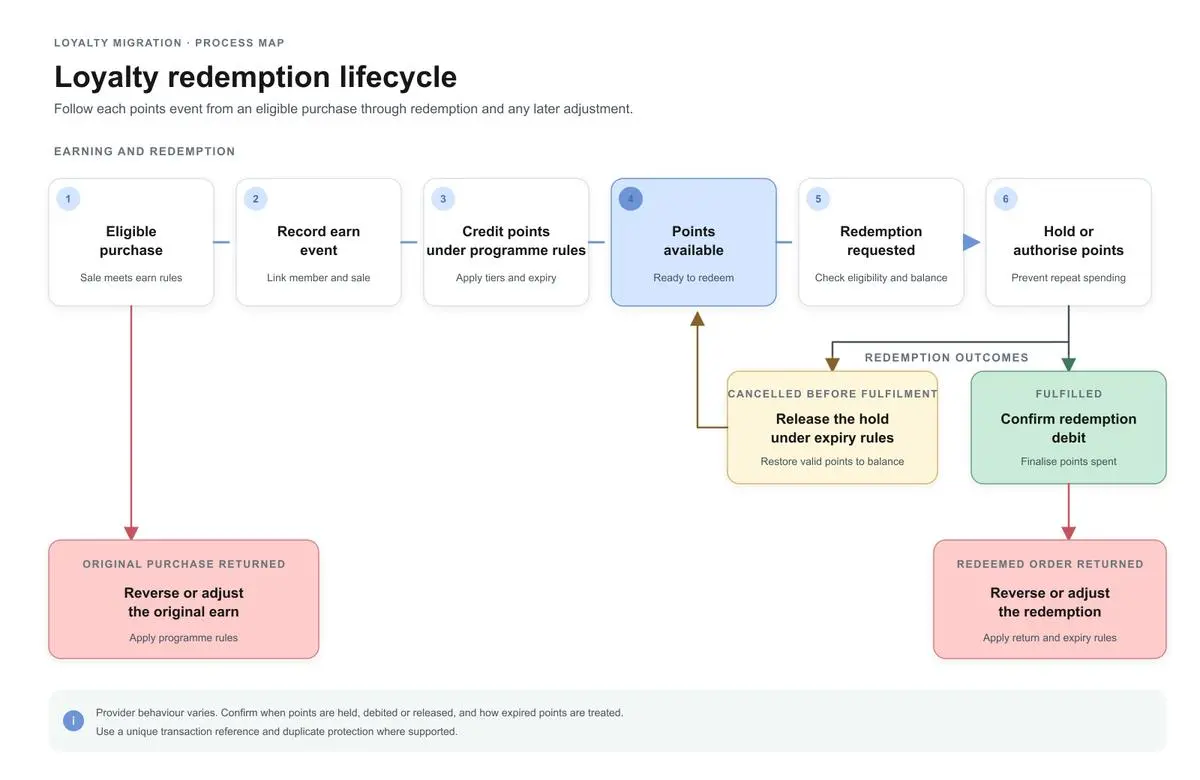
The diagram shows two possible ways to process a redemption. The retailer should confirm which approach its provider uses and when each balance change takes effect.
Before migration, check when points become unavailable, when the deduction is final and what happens if an order is cancelled or partially returned. Also confirm how expired points are treated when a reservation is released or a redemption is reversed. Returns of purchases that originally earned points need separate checks, as those points may also need to be adjusted.
Keep a unique transaction reference for each redemption so it can be traced across systems. Where supported, use an idempotency key or another duplicate-checking method to prevent repeated requests from deducting or crediting points more than once.
To test a loyalty migration, start with the actions customers take when using the programme: earning points on a purchase, redeeming them at checkout, cancelling an order or returning an item. For each action, check that the transaction is recorded correctly and the updated balance appears across the relevant channels.
Use a test environment where available, with accounts covering different membership tiers, balances and transaction histories. Decide what each test should produce before running it. For example, if a customer earns 50 points on a store purchase, those points should appear in their loyalty account and be visible to customer support, according to the programme's earning rules.
The following scenarios cover the main checks before launch.
Test scenario | What to check |
In-store purchase | Buy an eligible product and confirm that the correct member receives the expected points, recorded once against the sale |
Online purchase | Place an order and check when points are awarded. Confirm how fulfilment and cancellations affect the balance |
POS redemption | Redeem points at the till and check that the receipt and member account show the correct deduction or reservation |
Online redemption | Use points or a voucher at checkout. Confirm that eligibility is checked and the redemption is linked to the correct customer and order |
Retry after a timeout | Repeat a request after a simulated timeout. The transaction should be recorded once, without adding or deducting points again |
Order cancellation | Cancel an order before fulfilment and check that reserved or deducted points are handled according to the programme rules |
Full or partial return | Return all or part of an order and check that the relevant points earned or redeemed are adjusted correctly |
Points expiry | Cancel or reverse a redemption involving expired points. Check whether the points are restored and whether they can be spent again |
Duplicate member accounts | Test merged or duplicate profiles to confirm that balances and transaction histories remain linked to the correct member |
Integration failure | Disconnect the loyalty platform temporarily and restore the connection. Check that delayed transactions are processed once each |
Customer support lookup | Look up a member account and confirm that staff can see the original transaction, any adjustments and the current balance |
For every test, record the test ID, channel or store, member ID, transaction reference, expected result and actual result. Keep supporting evidence, such as transaction logs, receipts or account screenshots, along with the test status and responsible owner.
If a test fails, record what went wrong, who will fix it and the result of the next test. Pay particular attention to failed requests, delayed transactions and duplicate entries, since these can affect points balances even when the original purchase appears successful.
Before going live, confirm that all critical scenarios have passed and review any remaining discrepancies. Each unresolved issue should have an owner, an agreed resolution and a decision on whether it affects launch readiness.
A POS loyalty integration connects store transactions to the same member identity and reward rules used by ecommerce. To deliver a consistent omnichannel loyalty programme, establish how the till identifies a member, requests eligibility, applies a reward, records the sale and receives the resulting balance or status.
For the wider technical picture of connecting store and online systems, read our article on the POS Ecommerce Integration.
Test the whole sequence: a customer earns points in store, sees them against the correct account online, then redeems a reward through a supported channel. Repeat with a return and a delayed or retried event. Include staff-assisted lookup and a plan for unavailable connectivity, based on what the selected POS and loyalty provider actually support.
A retail loyalty integration also needs clear ownership of errors. Decide who monitors failed messages, who can correct a balance, what evidence is required for a manual adjustment and how corrections reach other channels. Keep a traceable record so support teams can explain what happened and avoid a repeat adjustment.
Moving to a new loyalty platform requires careful handling of existing accounts, points balances and transactions that are still being processed. Retailers also need to check that customers can continue using their benefits across stores and online once the switch is complete.
Fynd Engage supports the transfer of members, points, transaction histories and custom programme rules from an existing system. Fynd's team assists with planning, setup, testing, go-live and post-launch adjustments.
Once the programme is running on Engage, customers can earn and redeem points across stores, websites, apps and partner channels. The platform works directly with Fynd Commerce and Store OS and can connect to other systems through APIs. It also retries failed connections, flags errors for review and prevents repeated requests from crediting points twice. Points earned on returned items are adjusted according to the retailer's rules.
Amrita Bhambhani
Export a controlled snapshot, map each source balance to the destination’s point currency and status, then reconcile totals and member-level samples. Include expiry, tier qualification and pending redemptions, and keep source references so every balance can be explained.
Transfer member identifiers, relevant profile and preference fields, balances by currency and status, expiry and tier data, programme rules and any history needed for support or reporting. Define what is migrated, rebuilt or archived before launch.
Define how the old and new systems treat each open redemption at the cutover boundary, reconcile authorised but unfulfilled requests, and prevent duplicate retries. Give store and support teams a process for exceptions.
Test earn, redemption, cancellation, return, expiry, duplicate accounts and integration retries across POS, ecommerce and support tools. Record the expected and actual result for each scenario and retest any failure before sign-off.
Learn how to measure planogram compliance, run a retail shelf audit and use automated checks to assign and verify shelf corrections across stores.

Compare AI PIM software for ecommerce businesses in India. Explore catalog enrichment, marketplace listings, AI content generation, and channel publishing.

Compare WMS software for D2C businesses in India in 2027. Explore inventory, picking, returns and multi-warehouse features before choosing a system.
Fill out the form
Share your contact information to get started
Speak to an expert
A member of our sales team will get in touch with you