November 10, 2026
Planogram compliance: how to audit retail shelves
Learn how to measure planogram compliance, run a retail shelf audit and use automated checks to assign and verify shelf corrections across stores.
Amrita Bhambhani
November 10, 2026
Learn how to measure planogram compliance, run a retail shelf audit and use automated checks to assign and verify shelf corrections across stores.
Amrita Bhambhani
A planogram shows where each product should sit, how much shelf space it should occupy and how it should be displayed. The shelf customers see can drift from that plan as products sell out, items are misplaced or teams replenish shelves differently.
A product may have fewer facings than planned, or a promotional display may stay up after an offer ends. These discrepancies lower planogram compliance and can affect product visibility, on-shelf availability and the shopping experience.
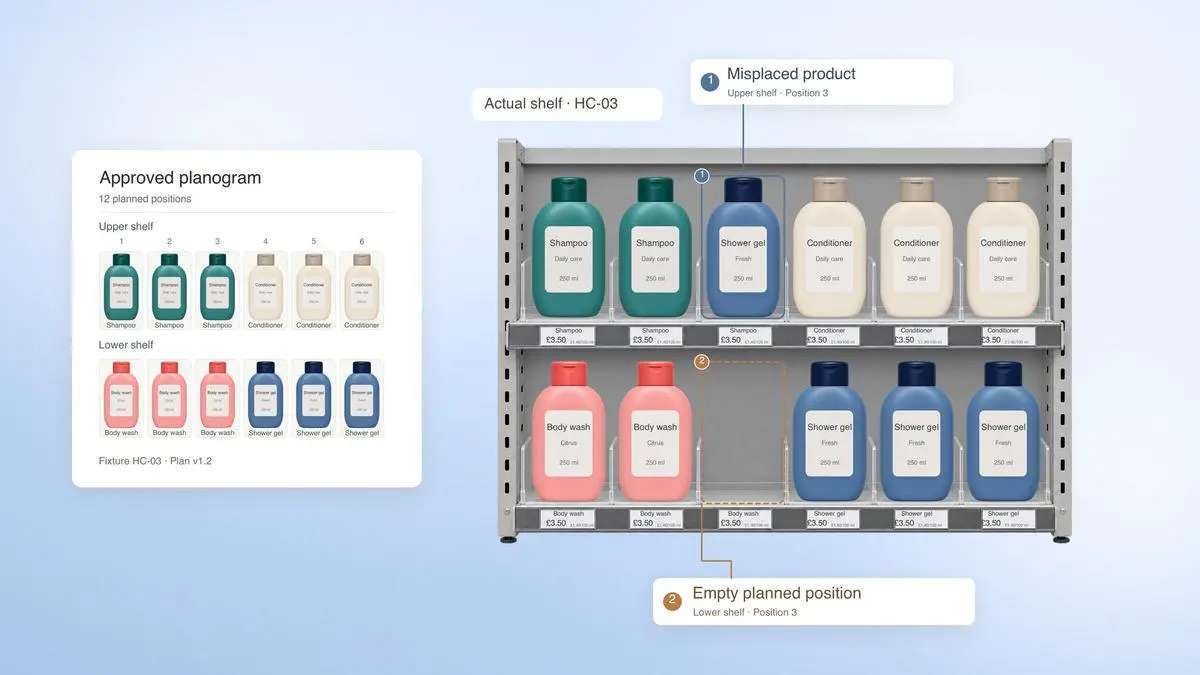
A planogram audit compares the actual display with the approved planogram and records each discrepancy. Each one then needs an owner for the correction and follow-up check that confirms the shelf is back in line.
Planogram compliance is how closely the live shelf matches the approved layout. Depending on the retailer’s audit rules, checks may cover product placement, facings, availability, pricing and promotional material. Retailers measure it through a planogram audit, and come to use the broader term shelf compliance for the full set of shelf checks.
Computer-vision-based planogram evaluation involves detecting and classifying products in shelf images, then comparing their positions with the expected layout. Recognising the products alone does not establish whether they are in the right place.
One placement-based score divides the number of planned product positions that are correct by the total number of planned positions. Retailers can calculate it per fixture, category or store, provided they use the same scoring rules when comparing results.
Retailers can calculate a basic compliance score using the following formula:
Planogram compliance (%) = (Correct product placements ÷ Total planned placements) × 100
For example, if a planogram specifies 100 product placements and 90 are correct, the shelf has a compliance score of 90%.
For this calculation, count every planned position in the denominator. If the expected product is missing, count that position as incorrect; do not remove an empty position from the calculation. Record stock availability separately so the score distinguishes a stockout from a product placed in the wrong position.
This percentage is a starting point, and a shelf at 95% compliance can still be missing a bestselling product or display an incorrect promotional price. Both could have a greater impact on sales than a product placed slightly out of position.
Report those findings alongside the placement score rather than adding them to the percentage:
Discrepancies: What is wrong with the display, such as missing products, incorrect facings or misplaced promotions?
Severity: Which issues need immediate attention based on their potential impact?
Resolution time: How quickly are identified issues corrected and verified?
Repeat issues: Are the same discrepancies appearing in subsequent audits?
When auditing a shelf, compare the current display with the approved planogram and record anything that needs correcting. The checks will depend on the category and fixture, but the following can be used across many retail stores.
Check | What to verify | Evidence to keep | Who is responsible |
Product placement | Each product is on the correct shelf and in its assigned position | Shelf photograph and approved planogram | Department manager |
Facings | Each product has the number of facings specified in the planogram | Photograph or facing count | Store assistant |
Availability | Products listed in the planogram are present and accessible | Photograph of empty or blocked shelf positions | Department manager |
Pricing | Shelf-edge labels match the products displayed and their current selling prices | Label photograph and price record | Store manager |
Promotions | Promotional products and signage are in the agreed locations, with the correct offers and dates | Photograph of the promotional display | Visual merchandising team |
Shelf condition (separate check) | Products are upright, visible and arranged as specified | Photograph of damaged or poorly arranged stock | Department manager |
Along with the findings, record the store, fixture ID and planogram version used for the audit. This makes it easier to check discrepancies later, particularly when a store has recently changed its shelf layout.
Retailers can check every planned position for a complete fixture score or sample selected products for a quicker assessment. If sampling is used, the report should say so.
Shelf edge pricing
In Great Britain, the Price Marking Order 2004 requires selling prices to include applicable taxes and, where required, retailers to display an unit price. The Order applies in England, Scotland and Wales; Northern Ireland has separate rules. Check the government guidance for the products and circumstances covered.
Check whether the label belongs to the product displayed and whether the price matches the retailer's current records. If there is a difference, the store team should investigate and correct it in line with the applicable pricing rules.
HFSS product placement
In England, qualifying retailers and stores must keep certain foods high in fat, salt or sugar (HFSS) out of restricted locations, including some entrances, aisle ends and checkouts. The rules include business-size and store-area criteria, as well as exemptions, so check the official guidance before treating a display as non-compliant.
Wales and Scotland have separate promotion and placement rules. Retailers operating across the UK should check the relevant guidance for each nation before using one audit standard for all stores.
Before starting a shelf audit, make sure the team has the latest approved planogram for the store and fixture. Check that the product assortment and layout are correct for the audit date, especially if the store has recently changed its displays or started a new promotion. An outdated planogram could lead to products being incorrectly flagged as missing or misplaced.
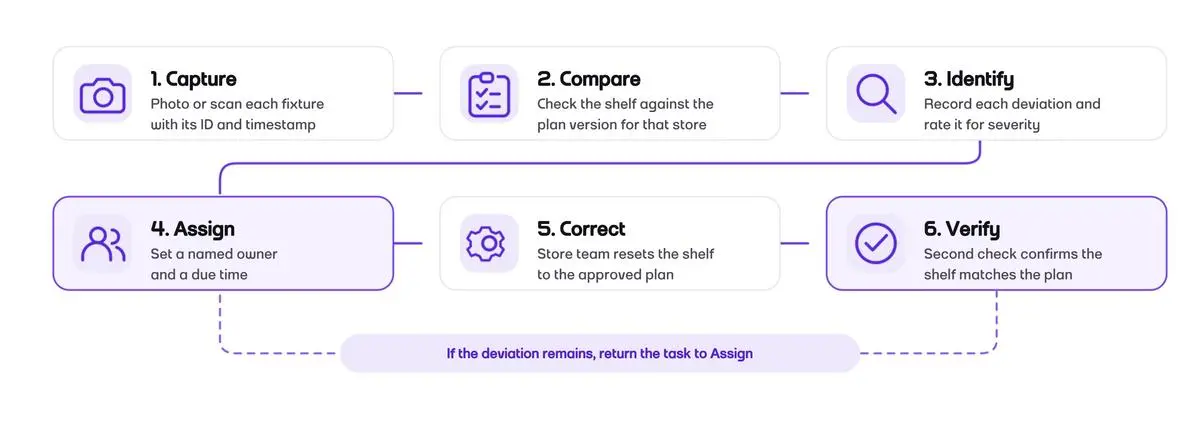
The audit can then be carried out in six steps:
Inspect the shelf: Take a clear photograph of the fixture or inspect it in person. Make sure the products, shelf positions and labels are visible. Follow the store's rules for taking and handling photographs.
Check against the planogram: Compare the shelf with the approved layout. Look at product positions, facings and availability, along with any pricing or promotional requirements.
Note what is wrong: Record each issue with enough detail for someone else to find it. For example, if a product is missing, specify the SKU, shelf position and where it should appear according to the planogram. Keep a photograph as evidence.
Decide who will fix it: Assign each issue to a store assistant or manager and agree on when it should be corrected. Missing priority products or incorrect promotional prices may need more urgent attention than minor arrangement issues.
Correct the shelf: Replenish missing products, adjust their positions or replace incorrect labels and promotional material. If a correction is not possible, record the reason and refer it to the relevant manager.
Check again: Once the correction is complete, inspect the affected part of the shelf to confirm it now matches the planogram. Keep the issue open if further work is needed.
Keep the audit findings and photographs together with the planogram version used. Managers can refer to these records when reviewing unfinished corrections or checking whether problems have returned.
When auditing a new layout or promotional reset, take dated photographs before trading begins and after any corrections. This helps teams confirm that the display was installed as approved and see what needed changing.
A store may have the right planogram but still struggle to maintain it throughout the day. Products sell out, customers move items around, staff have other tasks to manage and sometimes the problem starts before the products even reach the shelf.
Some common reasons for poor planogram compliance include:
Products missing from shelves: A product may be out of stock, or the inventory system may show available stock that cannot be found. This leaves empty spaces in the display and affects product availability.
Delays in restocking: Stock may be sitting in the backroom while shelves remain empty. During busy hours, replenishment can fall behind as staff attend to customers and other store duties.
Products placed in the wrong positions: Customers often pick up products and leave them elsewhere. Staff may also place items in the wrong position when restocking, particularly when several products have similar packaging.
Planograms that haven't been updated: Product ranges change, especially during seasonal launches and promotions. If the planogram still shows discontinued products or an older assortment, it becomes difficult for staff to follow.
Late pricing and promotional updates: A promotion may have started, but the new shelf labels or signage may not have been installed. This can happen when materials arrive late or stores receive instructions close to the promotion date.
Audit quality also affects the figures. Poor lighting, obstructed products or unclear photographs can affect automated shelf checks, and staff may interpret planogram instructions differently. A compliance score therefore reflects both shelf execution and reliability of the audit.
Some of these problems can be corrected during a routine shelf check, and others need a closer look.
For instance, if a product is missing from the same shelf week after week, the issue may lie with stock availability or replenishment. If several stores have incorrect promotional labels, it is worth checking when they received the updated pricing information.
Computer vision can analyse captured shelf images, recognise products, compare their positions with a planogram, count visible facings and flag products that appear to be missing or misplaced. A person, fixed camera or scanning robot captures the images; the AI analyses them. These checks can help retailers review shelves more often, but they do not by themselves confirm that a discrepancy has been corrected.
Shelf images can be collected in different ways:
Smartphones: Store assistants take photographs during routine shelf checks. This works well for inspecting individual fixtures or checking specific displays.
Fixed cameras: Cameras installed near shelves capture images at regular intervals, allowing retailers to monitor selected displays throughout the day.
Shelf-scanning robots: Robots equipped with cameras move through store aisles, photographing fixtures to cover larger areas on a schedule.
Computer vision can compare visible products and their positions with the approved layout. Recognition accuracy varies with similar packaging, poor lighting, crowded shelves and partially hidden items. Research on computer-vision-based planogram evaluation describes challenges in detecting products in real-world shelf images.
Some answers need data beyond the photograph. For example, AI may detect an empty shelf position and stock data shows whether the product is out of stock or waiting to be replenished from the backroom. Similarly, AI may read a shelf-edge price, and the retailer’s current pricing records confirm whether that price is correct.
Retailers should test automated checks on their own fixtures before introducing them across stores. Using photographs from different product categories, lighting conditions and shelves with known errors can help determine how often the system identifies genuine problems, misses discrepancies or raises false alerts.
Detection, task assignment and verification are separate stages. In a connected workflow, a detected discrepancy can be sent to a named store role with its shelf location and evidence. A team member then makes the physical correction, and a later image or scan checks whether the shelf matches the planogram.
For example, if a scan flags a missing shampoo, a store colleague can check whether stock is available and replenish the shelf. If the product cannot be found, the issue can be recorded for the team responsible for stock or replenishment. A follow-up scan can then confirm the product is back in the correct position, or leave the task open if the discrepancy remains.
Automated task creation and re-scan verification depend on the retailer’s systems and implementation. Unclear or low-confidence findings should be reviewed by a person before they are assigned or closed.
Checking shelf conditions across a grocery store takes time, particularly when products are constantly being picked up, moved or replenished. For store managers, having a regular view of product placement and shelf space can help them decide where attention is needed.
Fynd's AutRi is an autonomous shelf-scanning robot that helps with this. It moves through store aisles on scheduled scans, capturing shelf images that are analysed using computer vision. The system produces heatmaps of brand occupancy and product facings, showing how products are distributed across shelf levels.
Store managers can review these heatmaps on a dashboard to see how much shelf space different brands occupy and where displays may need attention. They can then examine the findings and ask store colleagues to make any necessary changes.
With AutRi, retailers can review shelf conditions from regularly captured images. This gives store teams a practical starting point for checking product placement and managing shelf displays.
Amrita Bhambhani
Not always. Stores may have different fixtures, product ranges or approved local layouts, so comparisons should account for the planogram each store is expected to follow. A single target is most useful when stores are being assessed against comparable plans.
The store should record the issue and escalate it for review rather than making an unapproved change. The retailer can then confirm whether the fixture needs a local planogram or whether the central plan needs updating.
Each planogram should have a clear version and effective date. Audits should use the version that applied to the store at the time, so teams aren’t flagged against an outdated layout.
It should be recorded as an availability issue, separate from a product placed in the wrong position. Keeping these categories distinct helps retailers see whether a gap comes from stock availability or shelf execution.
If the same discrepancy keeps returning, the plan may not reflect the store’s fixture, product range or operating conditions. Reviewing the plan can prevent teams from repeatedly correcting a layout that is impractical for that store.

Compare AI PIM software for ecommerce businesses in India. Explore catalog enrichment, marketplace listings, AI content generation, and channel publishing.
Compare WMS software for D2C businesses in India in 2027. Explore inventory, picking, returns and multi-warehouse features before choosing a system.
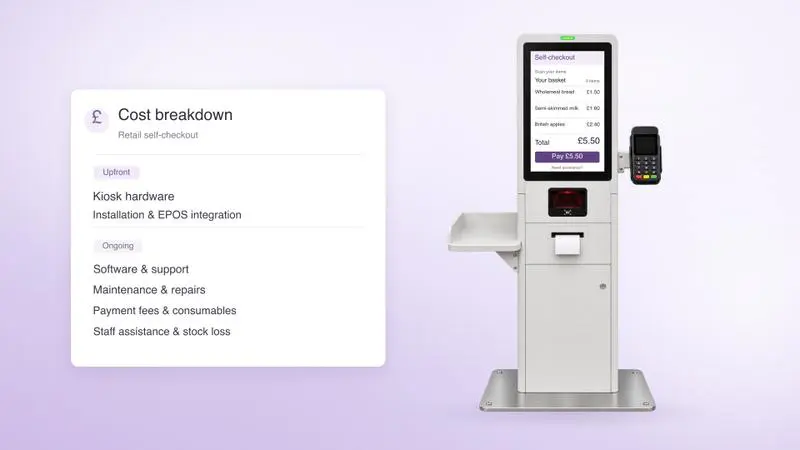
Self-checkout kiosk costs in the UK range from about £4,400 for compact hardware to £40,000 for a full grocery lane, before software and installation.
Fill out the form
Share your contact information to get started
Speak to an expert
A member of our sales team will get in touch with you