In an IT and service desk area, a male support engineer and a woman team lead review a ticket together on a monitor
Fynd ERP

A service desk that knows the customer and the order

Run support desks with queues, SLAs and knowledge, and handle incidents, problems and changes in the same system as the rest of your business.

Everything a support team needs

From the first message to a resolved ticket, with SLAs and an audit trail at every step.

Tickets and queues

Work tickets from shared queues, with types, priorities and owners.

Desks and teams

Run separate desks for customers, staff or partners, each with its own teams.

Channels

Tickets arrive from email, web chat and other connected channels.

SLAs and business hours

Set response and resolution targets that respect each desk's working hours.

Rules and canned replies

Automate routing and updates with rules, and answer common questions faster.

Incident, problem and change

Handle incidents, track root causes and plan changes on a shared calendar.

Knowledge base

Publish articles your team and customers can use to solve issues.

AI assistance

Get AI help to summarise tickets and draft replies, with settings you control.

Surveys and reports

Collect satisfaction surveys and track SLA performance in reports.

Who it's for

Managers, agents and IT teams work the same tickets.

Support manager

  • Desks, teams and queues in one place
  • SLA report by desk and period
  • Surveys on resolved tickets

Agents

  • Every ticket with SLA timers
  • Canned replies and AI drafted replies
  • Customer and order details in view

IT and change managers

  • Major incidents declared from a ticket
  • Problems linked to their incidents
  • Changes on a shared calendar

See the screens your team will use

Real screens from Fynd ERP, shown with demo data for a fictional company.

Every ticket with its type, queue, priority, status and assignee in one list. Open one to see its incident details, SLA timers and the conversation.

  • Priority and status on every row
  • Declare a major incident or link a problem
  • First response and resolution timers

A day on the service desk

Follow one ticket from the first message to the fix. Each step happens in Fynd ERP.

  1. Service Desk

    A customer writes in

    A message from a connected channel becomes a ticket on the right desk.

  2. Service Desk

    It is routed

    Rules set the type, priority and queue, and SLA timers start against business hours.

  3. Commerce and POS

    The agent has context

    The agent sees the customer and their recent orders on the ticket.

  4. Service Desk

    A pattern shows

    The ticket is raised as an incident, and it is linked to a problem opened for the root cause.

  5. Projects

    A fix is planned

    The fix is linked to a work item and a change goes on the change calendar.

  6. Service Desk

    The ticket closes

    The customer gets the reply and a satisfaction survey.

Service desk features in detail

The parts of a service desk support teams ask about most.

SLA management

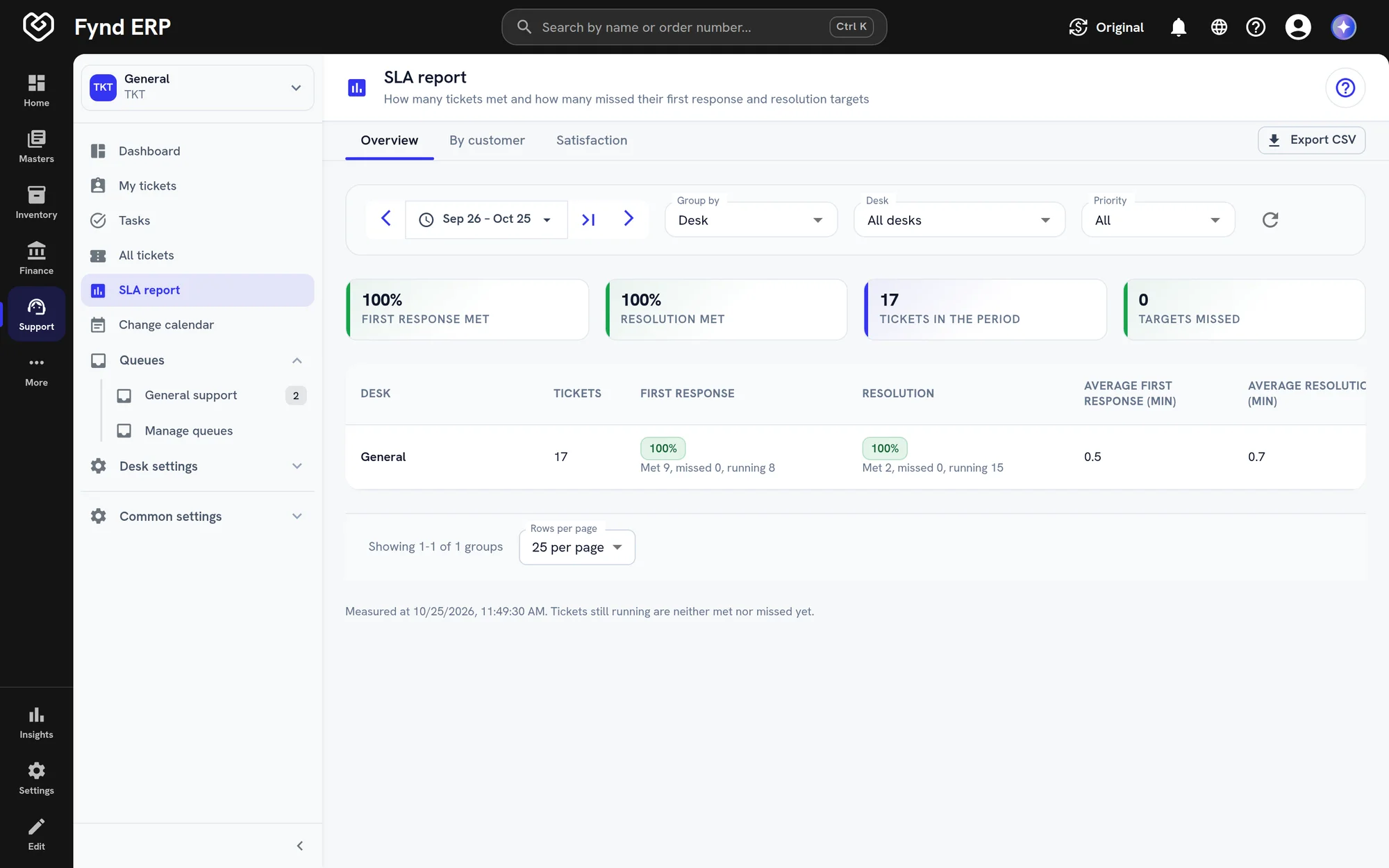
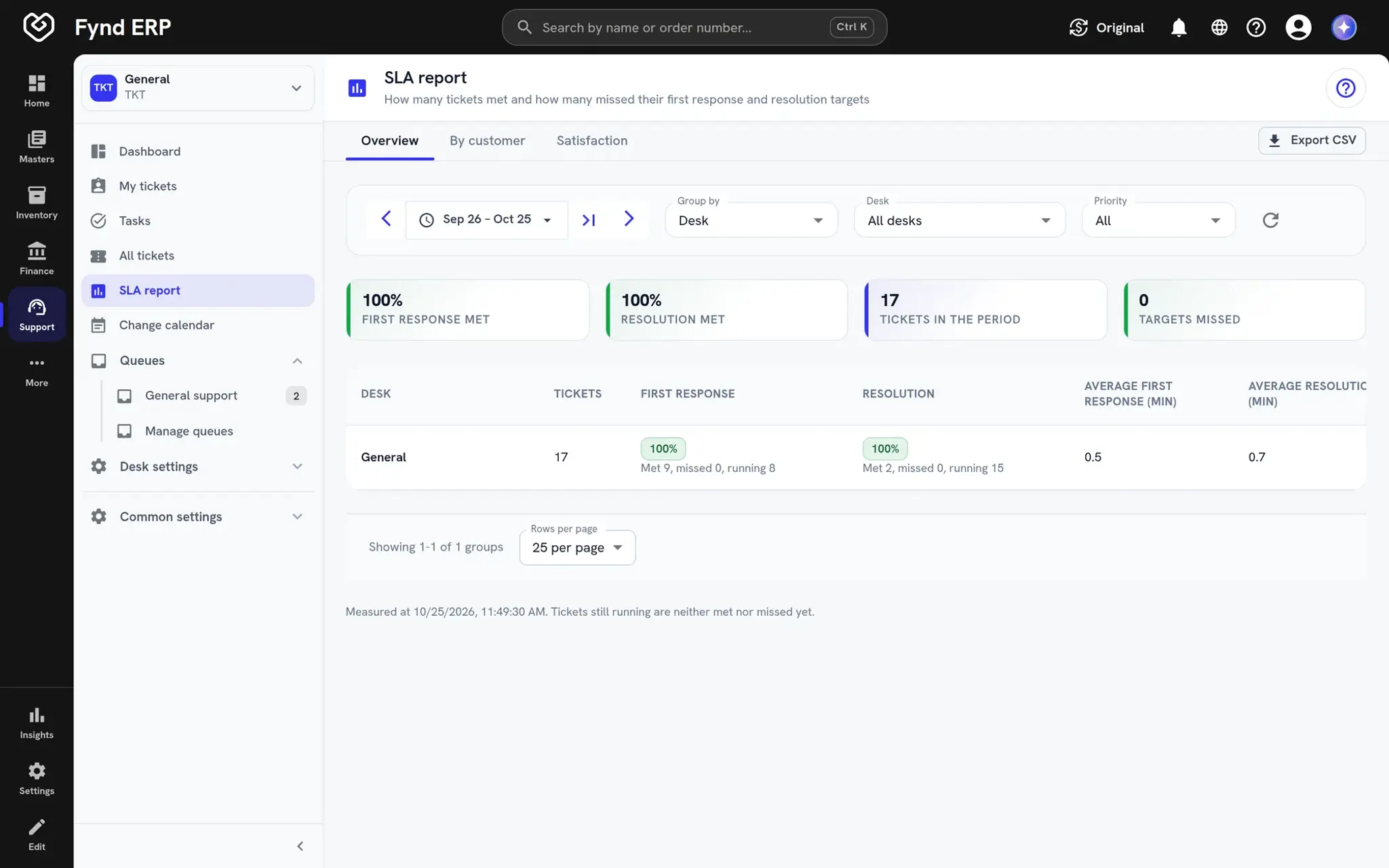
Set first response and resolution targets for each desk, measured against its business hours. Timers show on every ticket and the SLA report shows where targets were met or missed.
  • Response and resolution targets per desk
  • Business hours per desk
  • SLA report with breaches
Fynd ERP SLA report with first response and resolution rates

Incident and problem management

Declare a major incident from a ticket when many people are affected. Link incidents to a problem to track the root cause, so the same issue does not keep coming back.

  • Major incidents declared from a ticket
  • Incidents linked to a problem
  • Root cause tracked on the problem

Change management

Plan changes and see them on a shared change calendar before they go ahead. Link each change to the problem or work item it fixes.

  • Shared change calendar
  • Changes linked to problems and work items
  • ITIL settings you control

Knowledge base

Publish articles your agents and customers can use to solve common issues. Agents answer faster with articles and canned replies close at hand.

  • Articles for agents and customers
  • Canned replies for common questions
  • AI help to summarise and draft

Support is wired to the rest of the business

Agents see the customer's orders and history, and fixes reach the teams that own them.

Customer Communications

Conversations become tickets when they need tracked work.

Sales and CRM

Account owners see open tickets on the customer record.

Commerce and POS

Order and return details are in view on every ticket.

Field Operations

Tickets that need a visit become service orders.

Projects

Link tickets to work items when a fix needs planned work.

Workflow and Automation

Ticket events can start workflows across the business.

Frequently asked questions

Tickets, queues, desks, teams, channels, SLAs, business hours, rules, canned replies, a knowledge base, surveys, reports, AI assistance and incident, problem and change handling.

Yes. Each desk has its own teams, queues, ticket types and SLAs.

Yes. You can manage incidents, problems and changes, and plan changes on a shared calendar.

Response and resolution targets run against each desk's business hours, and the SLA report shows where targets were met or missed.

Yes. Tickets link to the customer and their orders, which sit in the same system.