Outside a customer site, a male field service engineer with a toolbag shows a tablet to a smiling woman customer next to a service van
Fynd ERP

Every field visit planned, done and billed

Dispatch the right technician with the right parts, capture the work on site and turn it into a charge without retyping anything.

Run your field teams from one place

From the service order to the closed job card, with the parts, people and charges tied together.

Service orders

Take requests from customers and sites, and track each order from intake to completion.

Dispatch board

Assign jobs to technicians and providers based on availability, skills and coverage.

Job cards

Technicians record work, time, parts and checklists on the job card while on site.

Van stock

Know which parts each van carries, who holds them and what was used on every job.

Preventive visits

Schedule recurring maintenance visits for customer assets so nothing is missed.

Sites and assets

Keep each customer site and its installed assets, with full service history.

Providers and capacity

Use your own crews or partner providers, and see capacity before you commit dates.

Templates and quality

Standard job templates and quality checks keep every visit consistent.

Charges and controls

Turn completed work into charges for billing, with controls on what can be charged.

Who it's for

From the desk that takes the request to the technician on site, everyone works the same job.

Service manager

  • Every open job by customer, site and priority
  • Capacity before you commit a date
  • Own crews and partner providers in one place

Dispatchers

  • Assign jobs on a dispatch board
  • Schedule appointments with the customer
  • Match jobs to skills and coverage

Field technicians

  • Job cards with checklists, time and parts
  • Site access notes before they arrive
  • Van stock they hold in custody

Billing team

  • Completed work turned into charges
  • Controls on what can be charged
  • Charges posted to receivables

See the screens your team will use

Real screens from Fynd ERP, shown with demo data for a fictional service company.

Service, inspection and sales visits per customer site, with priority, status and due date.

  • Service, inspection and sales work
  • Priority from low to urgent
  • Due dates per visit

A day in field operations

Follow one service visit from the request to the invoice. Each step happens in Fynd ERP.

  1. Field Operations

    A request comes in

    A customer reports a fault and a field work order is raised for their site.

  2. Field Operations

    It is scheduled

    The dispatcher books an appointment and assigns a technician with the right skills.

  3. Customer Communications

    The customer is told

    The customer gets an update on the visit through your connected channels.

  4. Field Operations

    Work is done on site

    The technician follows the site access notes and records work, time and checklists on the job card.

  5. Inventory

    Parts come off the van

    Parts used on the job are drawn from the van stock the technician holds.

  6. Finance and Accounting

    The visit is billed

    Completed work becomes charges, which turn into an invoice and post to receivables.

Field Operations features in detail

The parts of field service teams ask about most.

Field service dispatch

Assign jobs to your own technicians or to partner providers based on availability, skills and coverage. Book appointments and see capacity before you promise a date.

  • Dispatch board for the whole team
  • Appointments per work order
  • Own crews and partner providers

Job cards

Technicians record work, time, parts and checklists on the job card while they are on site. Safety critical steps are marked so they are not skipped.

  • Required work with safety critical steps
  • Time and parts on every job
  • Customer sign off

Van stock

Know which parts each van carries and which technician holds them. Parts used on a job come off the van and out of stock in the same step.

  • Parts held in custody per technician
  • Usage recorded on the job card
  • Same stock records as the warehouse

Preventive service visits

Schedule recurring maintenance visits for the assets installed at customer sites. Each visit keeps its history on the site and the asset.
  • Recurring visit schedules
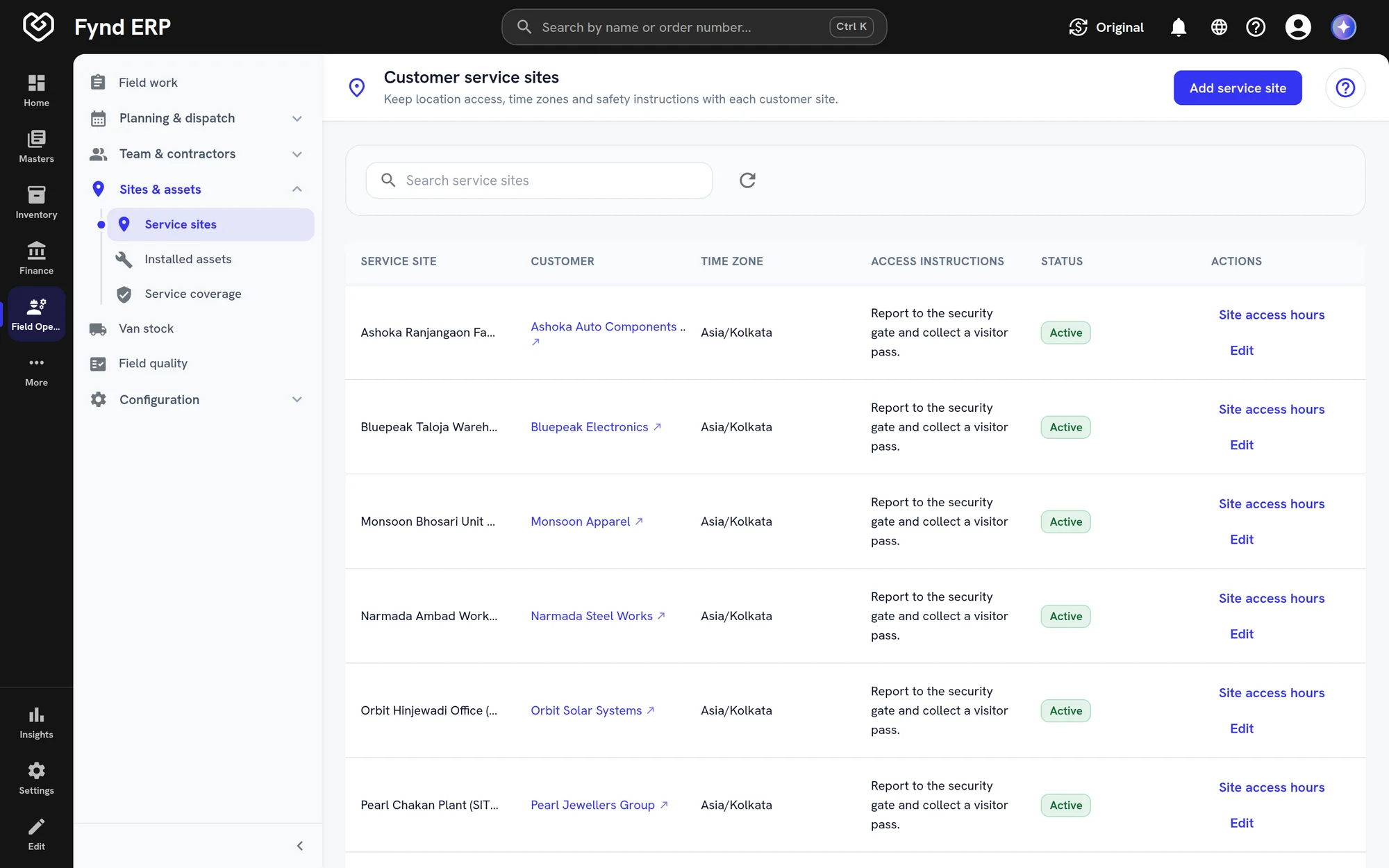
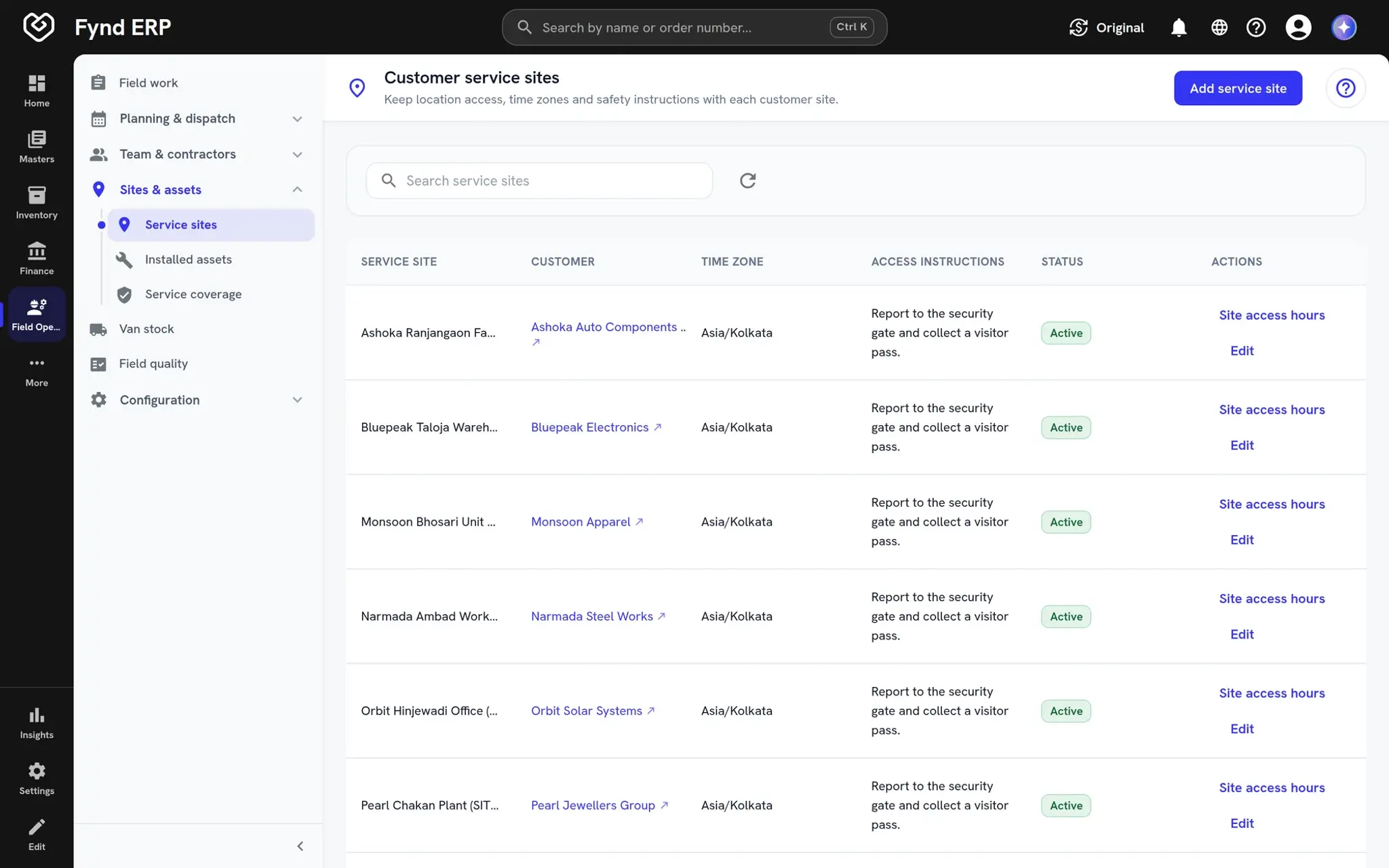
  • Sites with access and safety notes
  • Service history per installed asset
Fynd ERP customer service sites with access instructions

Field work is wired to the rest of the business

Jobs draw parts from stock, follow customer records and end up on the ledger.

Inventory

Van stock and parts used on jobs move through the same stock records.

Maintenance

Preventive plans and asset history share one model of the equipment.

Finance and Accounting

Job charges become invoices and post to receivables.

Sales and CRM

Service orders sit on the same customer accounts your sales team uses.

Customer Communications

Customers get updates on their visit through your connected channels.

Contract Labor

Partner crews and contractors are tracked alongside your own staff.

New

New in field operations

Recently added to this module.

  • Asset management

    Facilities and assets tied to finance, HR and the shop floor.

Frequently asked questions

Service orders, dispatch, job cards, van stock, preventive visits, sites and assets, providers, capacity, templates, quality checks and charges.

Yes. You can assign jobs to your own technicians or to partner providers, and track both in the same place.

Parts carried on each van are held in custody by a technician. Parts used on a job are recorded on the job card and drawn from stock.

Completed work becomes charges, which flow into billing and post to receivables, with controls on what can be charged.

Yes. Preventive schedules create visits for customer assets on a regular cadence.