Beside a large industrial machine with an open panel, a male maintenance technician with a torque wrench and a woman engineer with a tablet inspect it
Fynd ERP

Fix it before it stops the line

Maintenance runs on real usage from production, so the right tool gets serviced at the right time and nobody has to keep count by hand.

Maintenance driven by how your tools are used

Register tools and equipment, set rules once and let production data trigger the work.

Tool and equipment register

Keep every tool, fixture and machine in one register, with bulk import and per-station settings.

Usage from production

Usage is counted from real production runs, so cycles and hours stay accurate.

Preventive rules

Set rules on usage or on a schedule, and the system raises maintenance when they are due.

Alerts and escalation

Alerts reach the right person, who can acknowledge, assign or silence them, and overdue ones escalate.

Maintenance work orders

Plan and record maintenance work against the tool or station it belongs to.

Calibration

Track calibration status for your tools on a dedicated dashboard.

Tool telemetry

Bring in readings from connected tools to see how they are running.

Traceability and custody

Know which tool built which unit, and who holds a tool when it is reserved.

Tool finder

Find the tool you need, where it is and whether it is free to use.

Who it's for

Everyone who keeps the line running sees the same tools, alerts and jobs.

Maintenance manager

  • Open alerts and work orders in one view
  • Preventive rules on usage or on a schedule
  • Maintenance cost and calibration due on a dashboard

Technicians

  • Work orders with priority and schedule
  • Start and complete jobs against the right tool
  • Know where a tool is and who holds it

Production supervisor

  • Tool usage counted from real production runs
  • Alerts before a tool goes past its limit
  • Tools linked to the stations they serve

Quality team

  • Calibration status for every instrument
  • Overdue calibration flagged on the register
  • Which tool built which unit

See the screens your maintenance team will use

Real screens from Fynd ERP, shown with demo data for a fictional manufacturer.

Preventive, corrective, predictive and inspection jobs per machine, with priority, schedule and approval status.

  • Draft, submitted, approved and in progress
  • Priority from low to critical
  • Scheduled start for every job

A day in maintenance

Follow one tool from a production run to a closed work order. Each step happens in Fynd ERP.

  1. Manufacturing

    Production runs

    A press runs its shift on a station and every cycle is counted against the tool.

  2. Maintenance

    A rule is reached

    The tool reaches the usage limit in its preventive rule and an alert is raised.

  3. Maintenance

    Someone owns it

    The maintenance lead acknowledges the alert and assigns it, and it escalates if nobody does.

  4. Maintenance

    A work order is planned

    A preventive work order is raised for the press with a priority, a schedule and an approval.

  5. Procurement

    Parts are bought

    A replacement part that is not in stock goes out as a purchase request.

  6. Maintenance

    The job is done

    The technician completes the work order and the tool goes back into use.

  7. Reporting

    Cost is visible

    Maintenance cost and tool health show up on the equipment dashboard.

Maintenance features in detail

The parts of maintenance teams ask about most.

Preventive maintenance

Set rules on usage or on a calendar for each tool or machine. When a tool reaches its limit, the system raises an alert and the work can be planned before anything breaks.

  • Rules on cycles, hours or dates
  • Usage counted from production runs
  • Alerts that escalate when left open

Maintenance work orders

Plan preventive, corrective, predictive and inspection jobs against the tool or station they belong to. Each work order carries a priority, a schedule and an approval status.
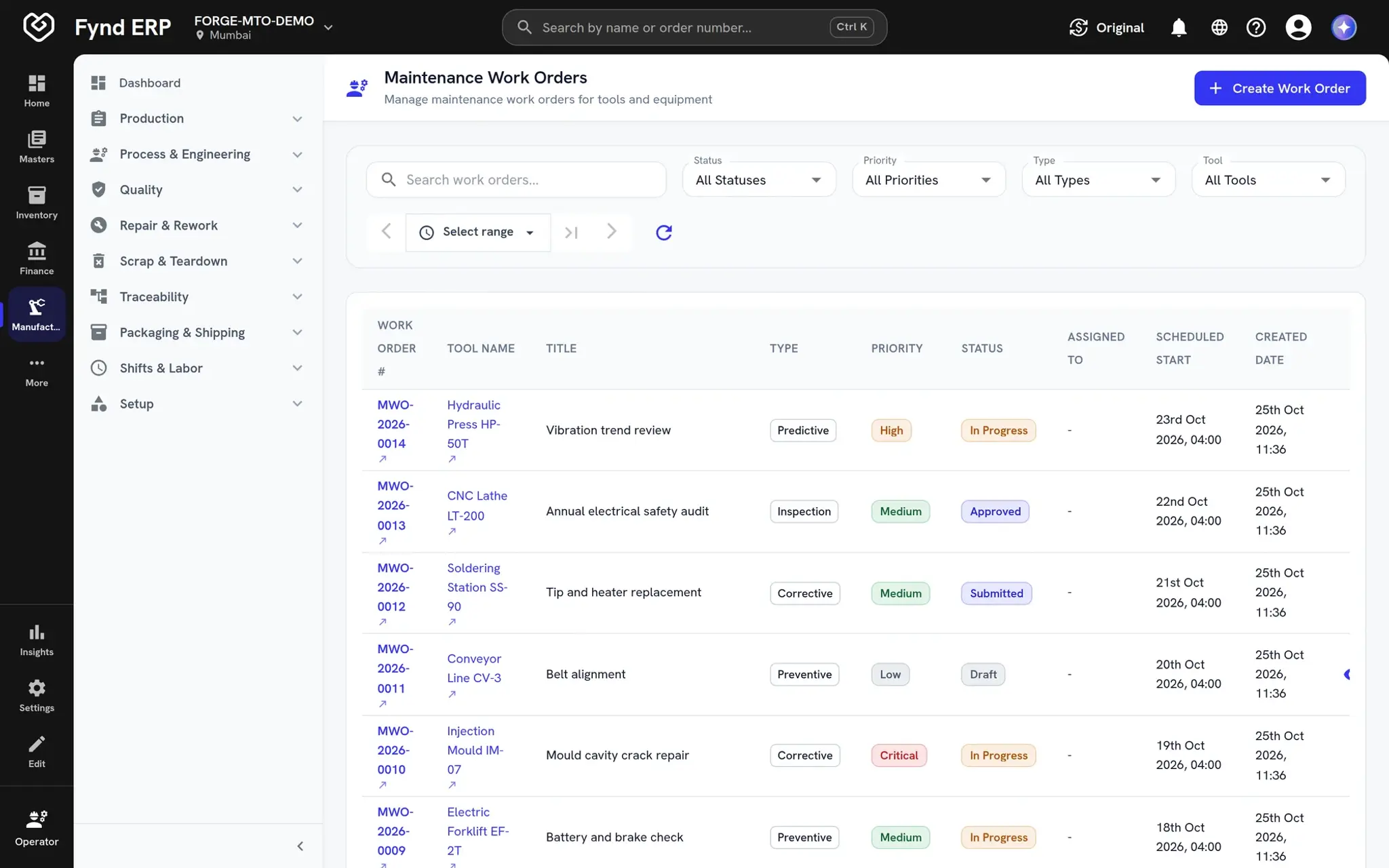
  • Draft, submitted, approved and in progress
  • Priority from low to critical
  • Requested by, assigned to and actual times
Fynd ERP maintenance work orders list with types, priorities and statuses

Calibration management

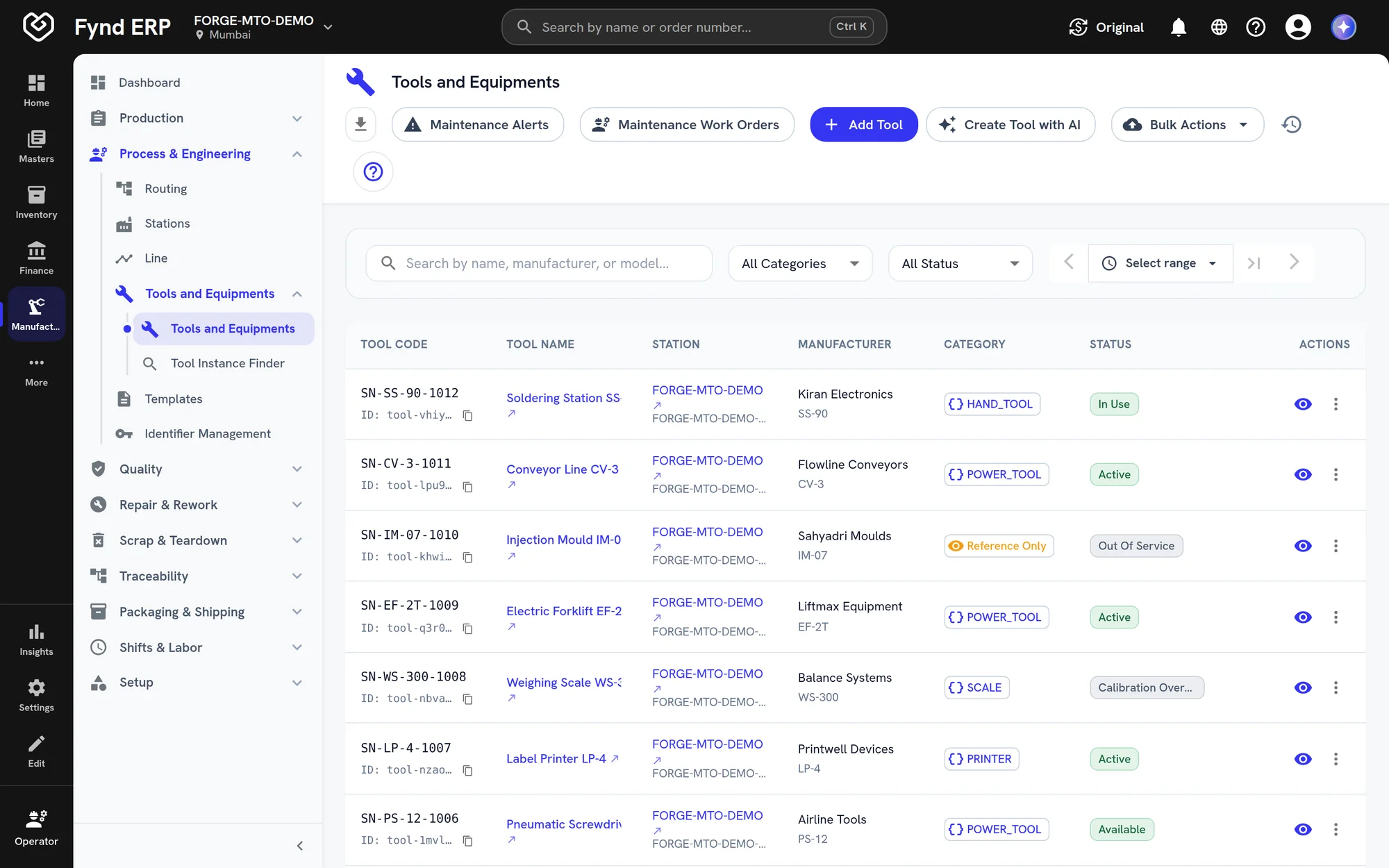
Track calibration status for every instrument in the register. Tools that are due or overdue are flagged, so nothing out of calibration is used on the line.
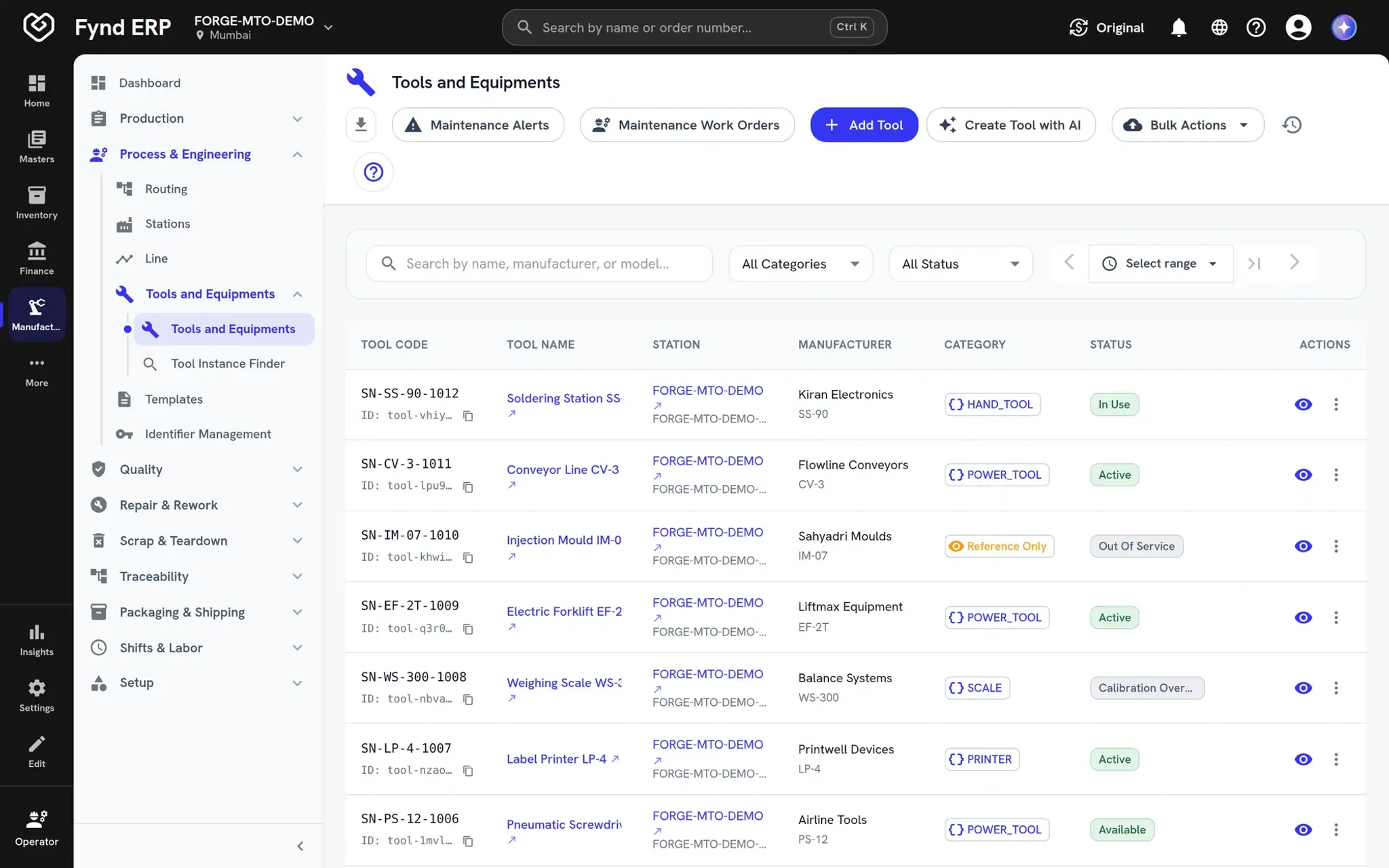
  • Calibration due and overdue flags
  • A dedicated calibration dashboard
  • Out of service status when a tool should not be used
Fynd ERP tools and equipment register with categories and statuses

Tool traceability

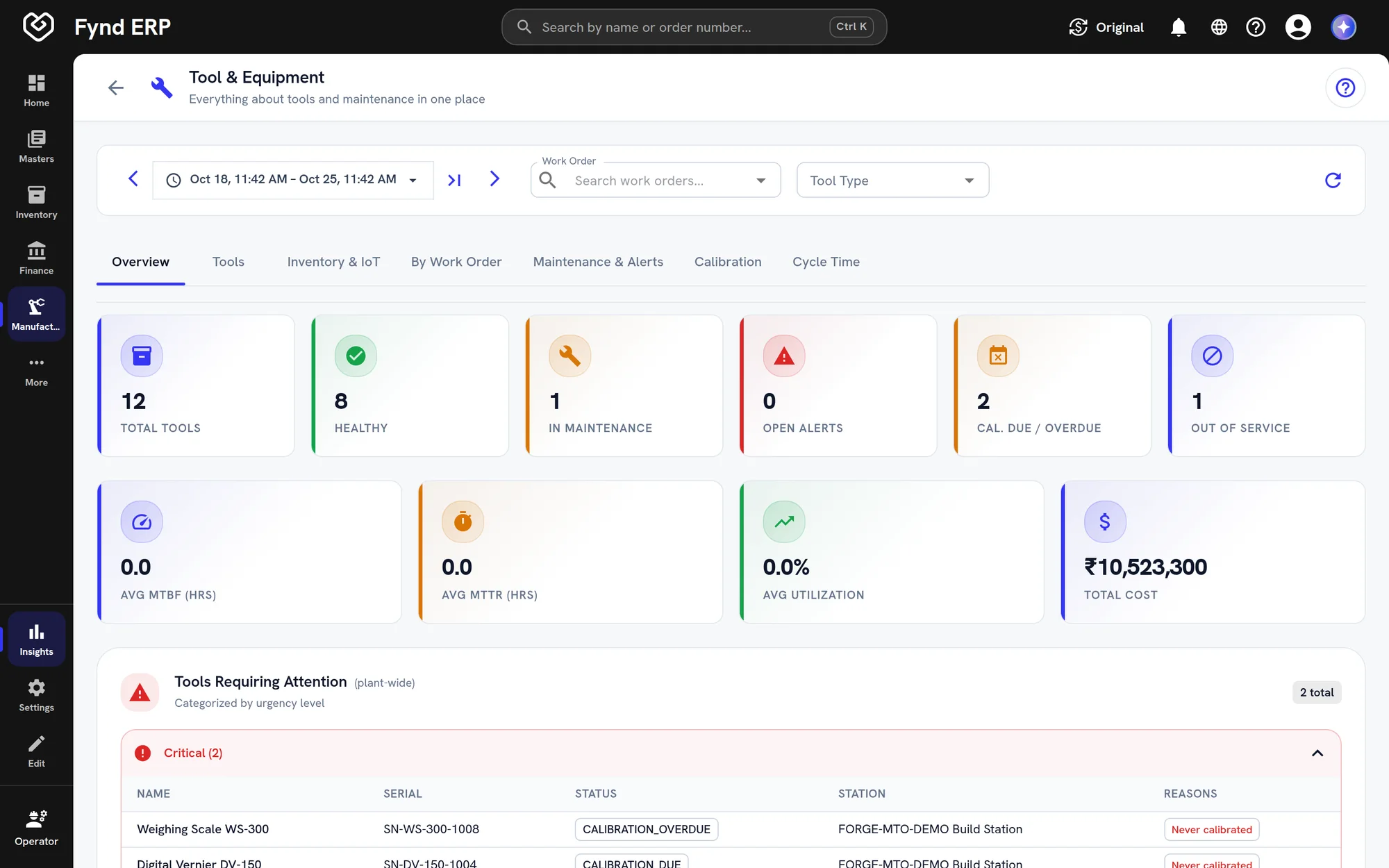
Know which tool was used on which unit and who holds a tool when it is reserved. When a tool is found faulty, you can see what it touched.
  • Tools linked to the units they built
  • Reservations and custody
  • A tool finder for location and availability
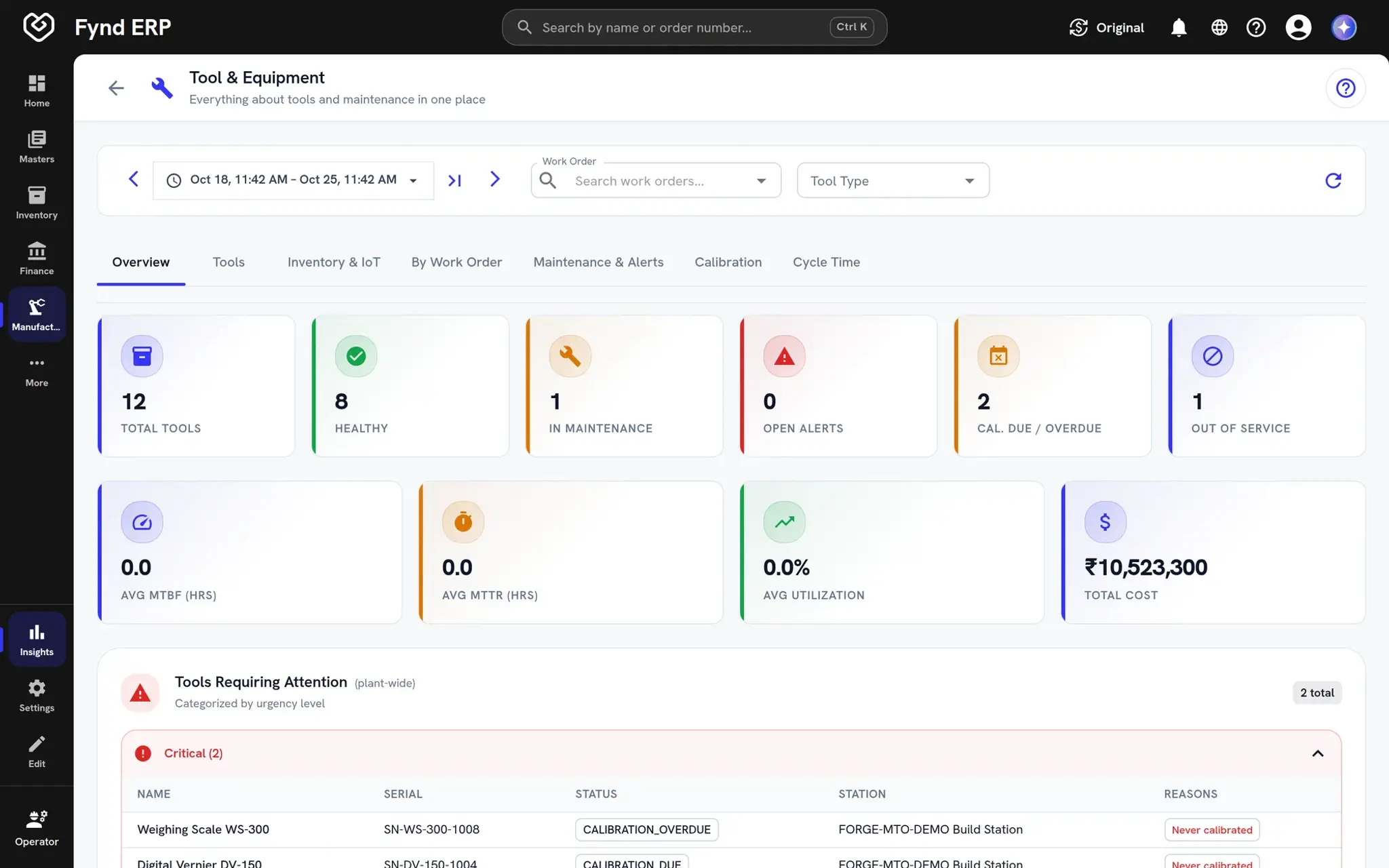
Fynd ERP tool analytics dashboard with health counts and tools needing attention

Maintenance is wired to the rest of the business

Production tells maintenance what to do, and the rest of the system keeps the record.

Manufacturing

Stations and production runs feed tool usage and trigger maintenance.

Finance and Accounting

Assets and depreciation sit in the same books as the tools you maintain.

Procurement

Buy replacement parts and machines through the same purchasing flow.

Workflow and Automation

Maintenance alerts can start workflows and notify the right team.

Field Operations

Repairs done on site are recorded against the same equipment.

Reporting

Tool analytics and calibration dashboards read live data.

New

New in maintenance

Recently added to this module.

  • Asset management

    Facilities and assets tied to finance, HR and the shop floor.

Frequently asked questions

A tool and equipment register, usage from production, preventive rules, alerts and escalation, maintenance work orders, calibration, tool telemetry, traceability and a tool finder.

You set rules on usage or on a schedule. When a tool reaches the limit or the date, the system raises a maintenance alert.

Usage is counted from production runs on the stations where the tools are used, so you do not keep counts by hand.

Yes. Tool traceability links tools to the units they were used on, and reservations show who holds a tool.

Alerts can be acknowledged, assigned or silenced, and alerts left open escalate under your rules.