In a modern retail store, a woman store associate in an apron checks out a customer at a sleek counter with a tablet point of sale
Fynd ERP

Sell everywhere from one order book

Ring up sales in store, take orders online and from businesses, and fulfil them from the right location, with stock and the ledger updating as you go.

Commerce for stores and every channel

Checkout, orders, fulfilment and money, all on the same records as your stock and books.

Point of sale

A fast sell screen for store staff, with tenders, discounts and receipts.

Offline selling

Keep selling when the connection drops, and sync safely when it returns.

Cash office

Open and close the business day, count tenders and reconcile the till.

Orders from every channel

Store, online, B2B and bulk orders share one order book with rules and statuses you set.

Fulfilment

Route orders to the right fulfilment node, ship them and handle delivery exceptions.

Returns and refunds

Accept returns, schedule pickups and issue refunds and credit notes.

Pricing and promotions

Price lists, discounts and promotions applied the same way on every channel.

Gift cards and wallets

Issue gift cards and customer wallets, with every transaction tracked.

Marketplaces and settlements

Bring in marketplace orders and reconcile settlements, payouts and cash on delivery.

Who it's for

Store teams, order teams and finance work from the same orders and stock.

Store managers

  • Open and close the business day
  • Count tenders and reconcile the till
  • Returns and refunds handled at the counter

Cashiers

  • Scan or search products and take payment fast
  • Several tenders on one sale
  • Keep selling when the network drops

Order and fulfilment teams

  • Store, online, B2B and bulk orders in one order book
  • Orders routed to the right fulfilment node
  • Delivery exceptions and return pickups in one place

Finance

  • Sales, refunds and tenders post on their own
  • Cash on delivery reconciled
  • Marketplace settlements matched to orders

See the screens your team will use

Real screens from Fynd ERP, shown with demo data for a fictional retailer.

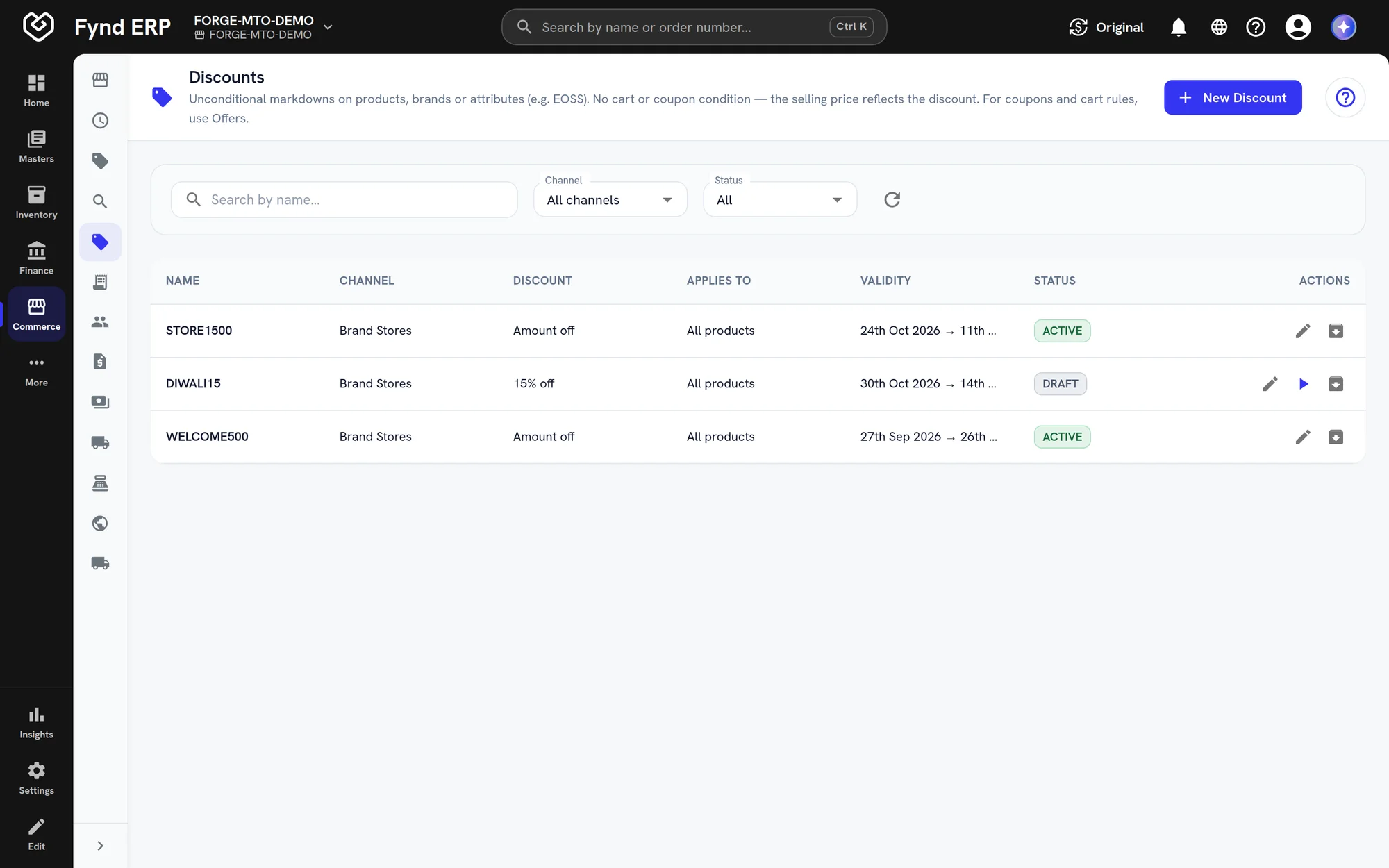
Every offer by channel with its effect, trigger, validity and status. Open one to set what it targets, who is eligible and its codes.

  • Percent off, amount off and buy X get Y
  • Automatic or code triggered
  • Draft, scheduled and active offers in one list

A day in commerce

Follow one online order from checkout to the books. Each step happens in Fynd ERP, so nothing is keyed in twice.

  1. Commerce and POS

    An order comes in

    A customer orders two items online and the order lands in the same order book as store sales.

  2. Commerce and POS

    It is routed

    Order rules send it to the fulfilment node that has the stock.

  3. Warehouse Management

    It is picked and packed

    The warehouse picks and packs the order like any other.

  4. Transport Management

    It ships

    The shipment goes out with a carrier and its freight cost follows the order.

  5. Loyalty and Rewards

    The customer earns points

    Once the shipment is delivered, loyalty points are added to the customer's balance.

  6. Commerce and POS

    One item comes back

    The customer returns one item, a pickup is scheduled and a refund is issued.

  7. Finance and Accounting

    The books stay right

    The sale, the refund and the tender post to finance through posting profiles.

Commerce and POS features in detail

The parts of commerce retail teams ask about most.

Point of sale with offline mode

Store staff scan, apply offers and take payment on a fast sell screen. When the connection drops the store keeps selling, and sales sync safely when it returns.

  • Scan or search products
  • Several tenders on one sale
  • Offline sales synced without duplicates

Omnichannel order management

Store, online, B2B, bulk and marketplace orders share one order book with the same rules and statuses. Each order is routed to the fulfilment node that can serve it.

  • Order sources, rules and statuses you set
  • Routing to fulfilment nodes
  • Order exceptions in one list

Returns and refunds

Accept returns in store or online and schedule pickups for the items going back. Refunds and credit notes are issued against the original order.

  • Return pickup slots
  • Refunds and credit notes
  • Stock updated when items come back

Cash office and end of day

Open and close the business day for each store and count every tender. Differences show up at close, before the day's sales reach the books.

  • Business day open and close
  • Tender counts and till reconciliation
  • Posting to finance after close

Commerce is wired to the rest of the business

Every sale moves stock and posts to the books, with no export in between.

Inventory

Sales and returns update stock at the store or node right away.

Finance and Accounting

Tenders, refunds and cash on delivery post through posting profiles.

Product Information

Every channel sells from the same catalogue and attributes.

Warehouse Management

Online orders are picked and packed in the warehouse.

Transport Management

Shipments and carrier costs follow each order.

Customer Data Platform

Store and online purchases feed each customer profile.

New

New in commerce

Recently added to this module.

  • Loyalty and rewards

    Earning, tiers, refunds and returns inside commerce.

Frequently asked questions

A store sell screen with offline selling, a cash office, orders from every channel, fulfilment, returns, pricing and promotions, gift cards, wallets and marketplace settlements.

Yes. The POS keeps working offline and syncs sales safely when the connection returns.

Yes. Store, online, B2B and bulk orders share one order book, with the same rules and statuses.

Marketplace orders come into the same order book, and settlements and payouts are reconciled against them.

Yes. Sales, refunds and tenders post to finance through posting profiles, so there is no manual export.