Outside a small neighbourhood shop, a male field sales representative with a tablet takes an order from a smiling shopkeeper
Fynd ERP

See every distributor, outlet and beat in one place

Plan beats, take secondary orders in the field, track distributor stock and settle schemes and claims, all on the same ledger as the rest of the business.

Run your distribution network end to end

From distributor masters to schemes and claims, built for consumer goods sold through partners.

Distributors and outlets

Masters for distributors, outlets and territories, so every sale has a place in your network.

Beats and journey plans

Plan beats and journey plans for field users, and track every visit against the plan.

Field visits

Record visits on the go, with no-order reasons when an outlet does not buy.

Secondary sales orders

Take orders from outlets on behalf of distributors and follow them to fulfilment.

Distributor stock

See what each distributor holds, so orders and schemes match real stock.

Van sales

Load vans, sell on the route and reconcile what came back.

Trade schemes

Set up schemes and promotions for distributors and outlets, with clear rules.

Claims and incentives

Handle distributor claims and incentive plans, with settled amounts posted to finance.

Merchandising audits

Run surveys and shelf audits at outlets to check visibility and stock on shelf.

Who it's for

Sales leaders, field teams and finance work from the same network and the same numbers.

Head of sales

  • Primary and secondary sales in one list
  • Coverage by territory, beat and outlet
  • Scheme spend and claims in view

Area managers

  • Beats and journey plans for each field user
  • Visits tracked against the plan
  • Distributor stock before you push an order

Field sales reps

  • Today's beat and outlets to visit
  • Secondary orders taken at the outlet
  • No-order reasons when an outlet does not buy

Finance and trade marketing

  • Schemes set up with clear rules
  • Claims tracked to settlement
  • Settled amounts posted to the ledger

See the screens your team will use

Real screens from Fynd ERP, shown with demo data.

Every distributor, super stockist, wholesaler and forwarding agent in one register, with type, linked customer, outlet count and status. One click takes you to the outlets they serve.

  • Active, draft, suspended and onboarding partners
  • Linked customer account per partner
  • Outlet count per partner

A day in distribution

Follow one outlet order from the beat plan to a settled claim. Each step happens in Fynd ERP.

  1. Distributor Management

    The beat is planned

    A field rep starts the day with a journey plan of outlets on their beat.

  2. Distributor Management

    The outlet is visited

    At a toko the rep records the visit and runs a quick shelf audit.

  3. Distributor Management

    An order is taken

    The rep takes a secondary order on behalf of the distributor, and the scheme on that product applies.

  4. Distributor Management

    Stock is checked

    The order is matched to what the distributor actually holds.

  5. Inventory

    The distributor restocks

    A primary order moves stock from your own inventory to the distributor.

  6. Finance and Accounting

    The claim is settled

    The distributor claims the scheme amount, and the settled claim posts to the ledger.

Distributor Management features in detail

The parts of distribution teams ask about most.

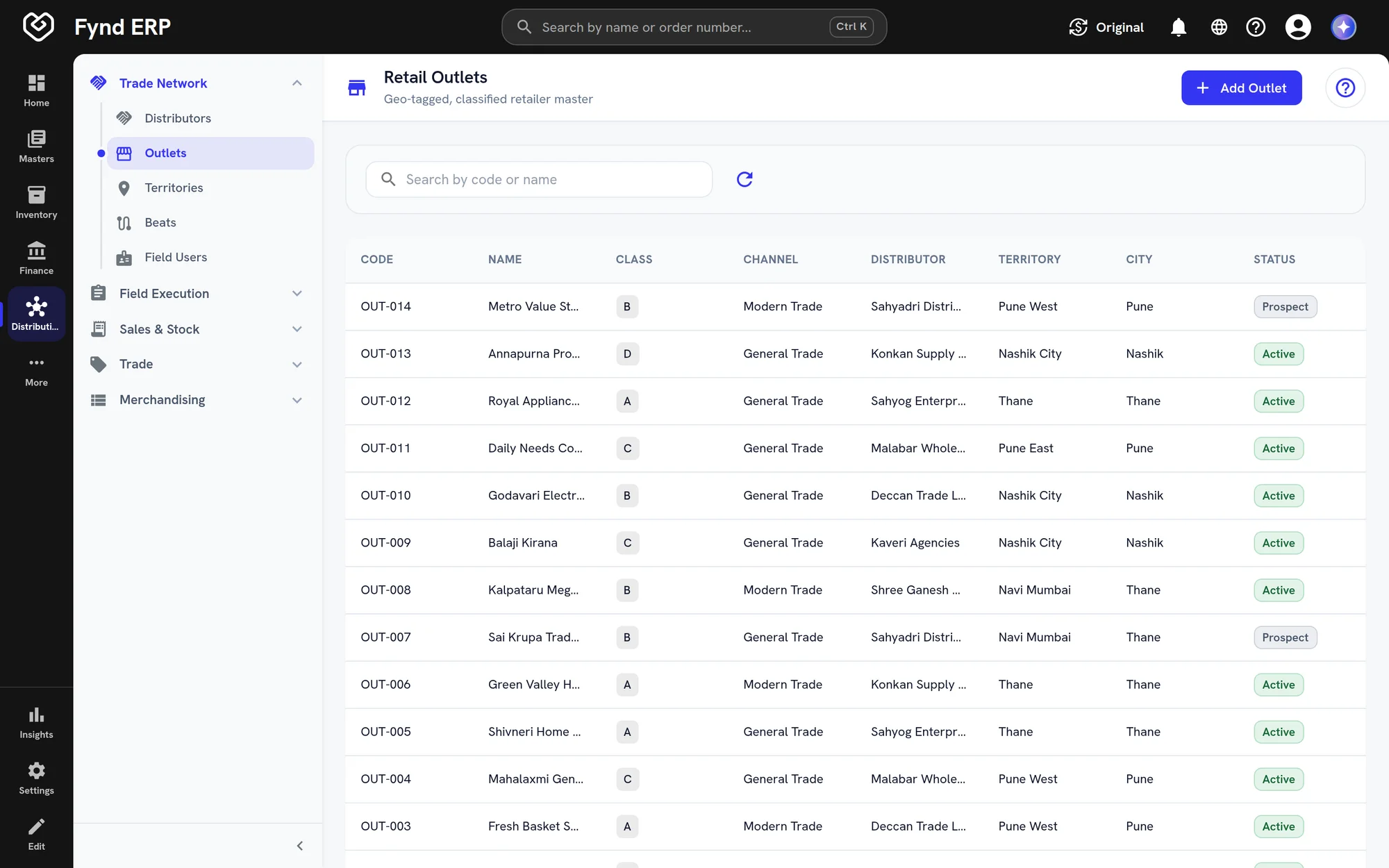
Beat and journey planning

Plan beats and journey plans for every field user across your territories. Each visit is recorded against the plan, with a reason when an outlet does not order.
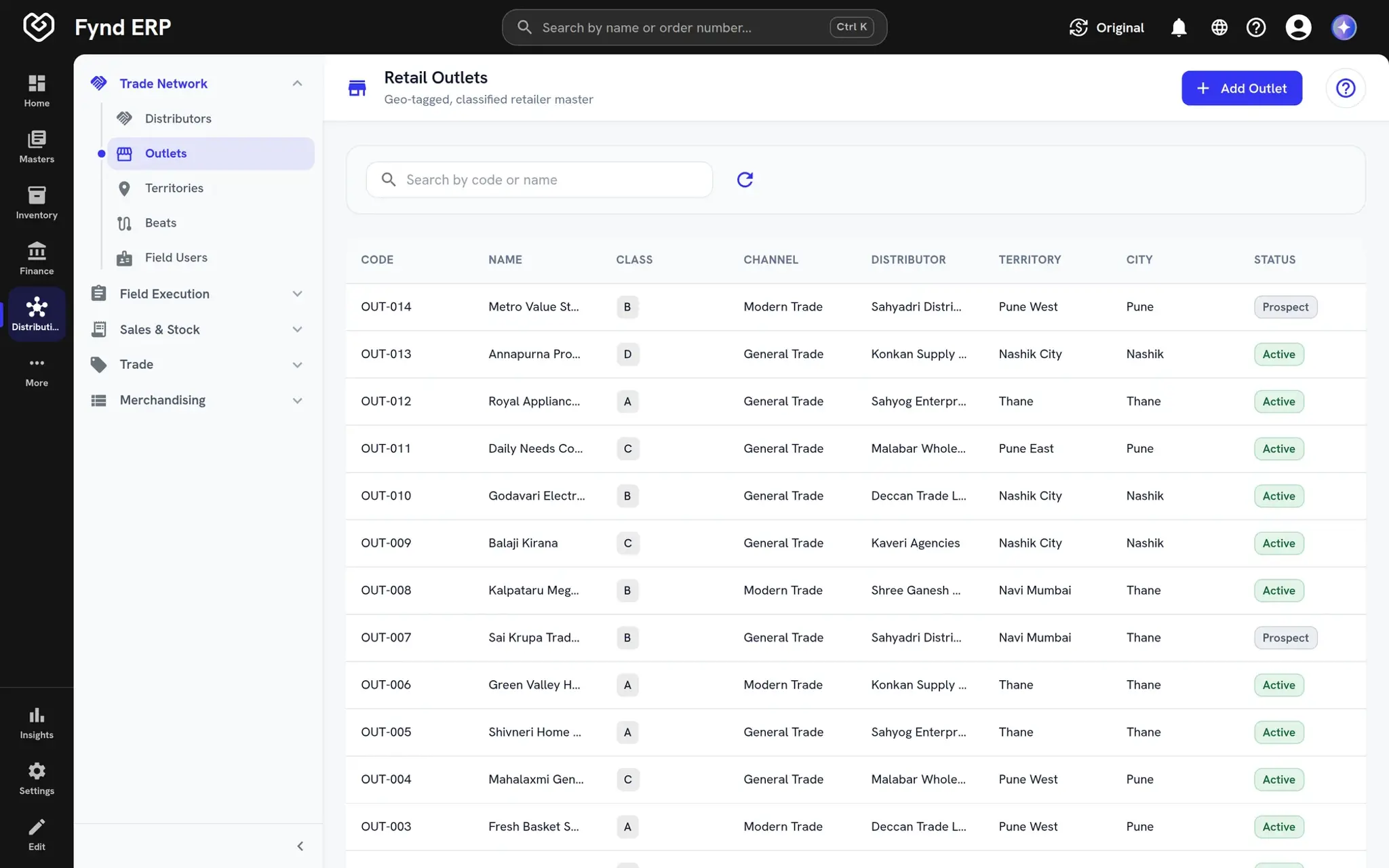
  • Territories, beats and field users
  • Visits tracked against the plan
  • No-order reasons captured
Fynd ERP retail outlets list with class, channel, distributor and territory

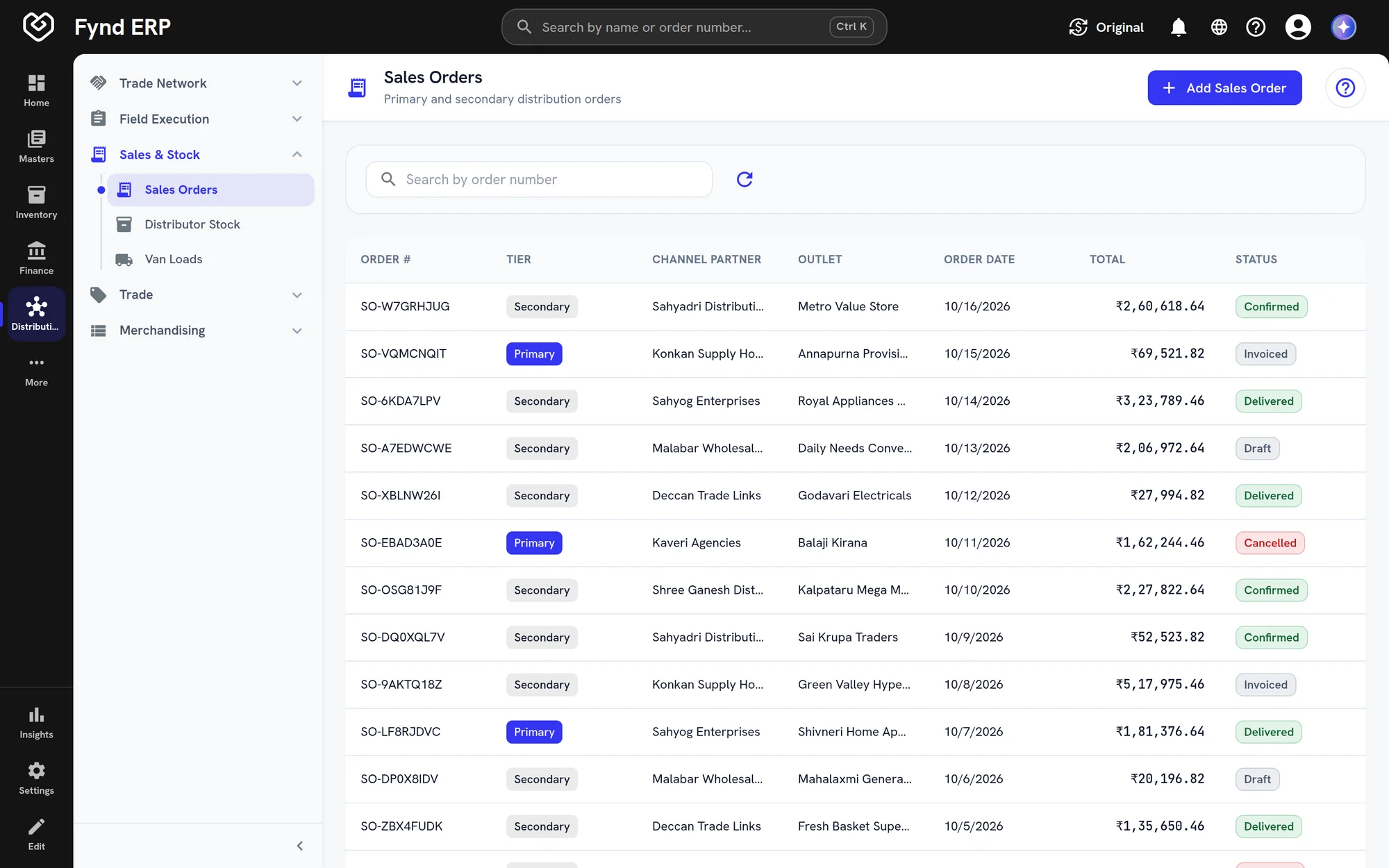
Secondary sales orders

Take orders from outlets on behalf of distributors and follow them to delivery. Primary and secondary orders sit in one list with their tier, partner and value.
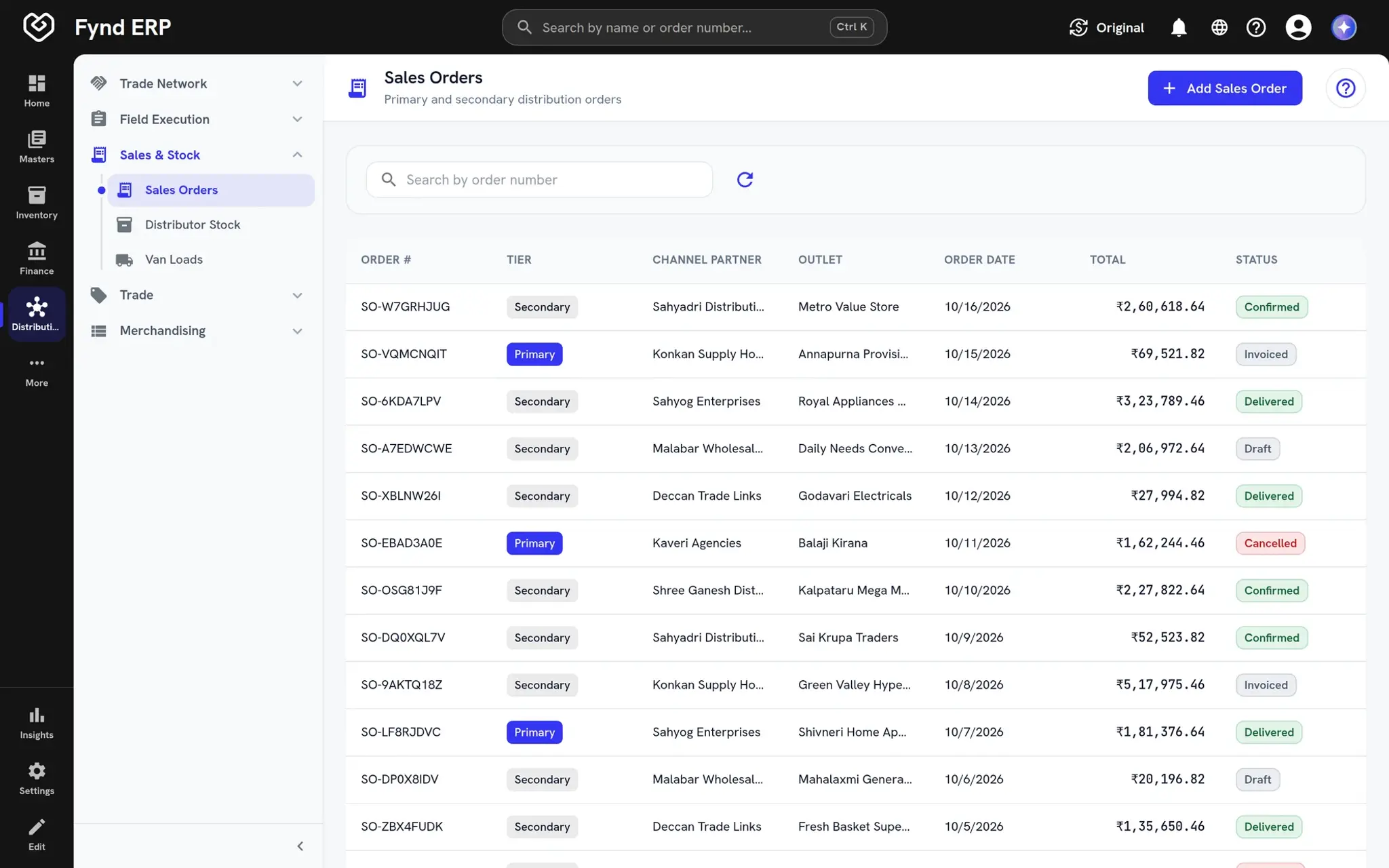
  • Primary and secondary tiers
  • Confirmed, invoiced and delivered
  • Matched to distributor stock
Fynd ERP distribution sales orders with tiers, totals and statuses

Van sales

Load a van, sell along the route and reconcile what came back at the end of the day. Every sale on the route is recorded against the outlet.

  • Van loads from stock
  • Sales recorded on the route
  • Reconciliation of the load

Trade schemes and claims

Set up slab, volume, value and free goods schemes with dates and enrolled partners. Distributor claims are tracked to settlement and the paid amounts post to finance.

  • Slab, volume, value and free goods
  • Enrolment by partner
  • Claims settled and posted to the ledger

Distribution is wired to the rest of the business

Partner sales, stock and money stay in one system.

Finance and Accounting

Settled claims and paid incentives post to the ledger.

Inventory

Primary stock moves to distributors from your own inventory.

Field Operations

Field users plan and record their visits on the move.

Sales and CRM

Distributor accounts and pipelines sit alongside your direct customers.

Transport Management

Van loads and deliveries follow the same transport records.

Reporting

Secondary sales, scheme spend and coverage roll up into reports.

Frequently asked questions

It manages the network that sells through partners: distributors, outlets, territories, beats, field visits, secondary orders, distributor stock, van sales, schemes and claims.

Yes. Field users follow beats and journey plans, record visits and take secondary orders at outlets.

Yes. You can load vans, sell along the route and reconcile the load afterwards.

Schemes are set up with their rules, and distributor claims are tracked to settlement, with paid amounts posted to finance.

Yes. Surveys and shelf audits capture how products look and what is on the shelf at each outlet.