November 3, 2026
POS ecommerce integration
How POS ecommerce integration works, how stock syncs between stores and online, which system should hold master data, and what happens when a sync fails.
Amrita Bhambhani
November 3, 2026
How POS ecommerce integration works, how stock syncs between stores and online, which system should hold master data, and what happens when a sync fails.
Amrita Bhambhani
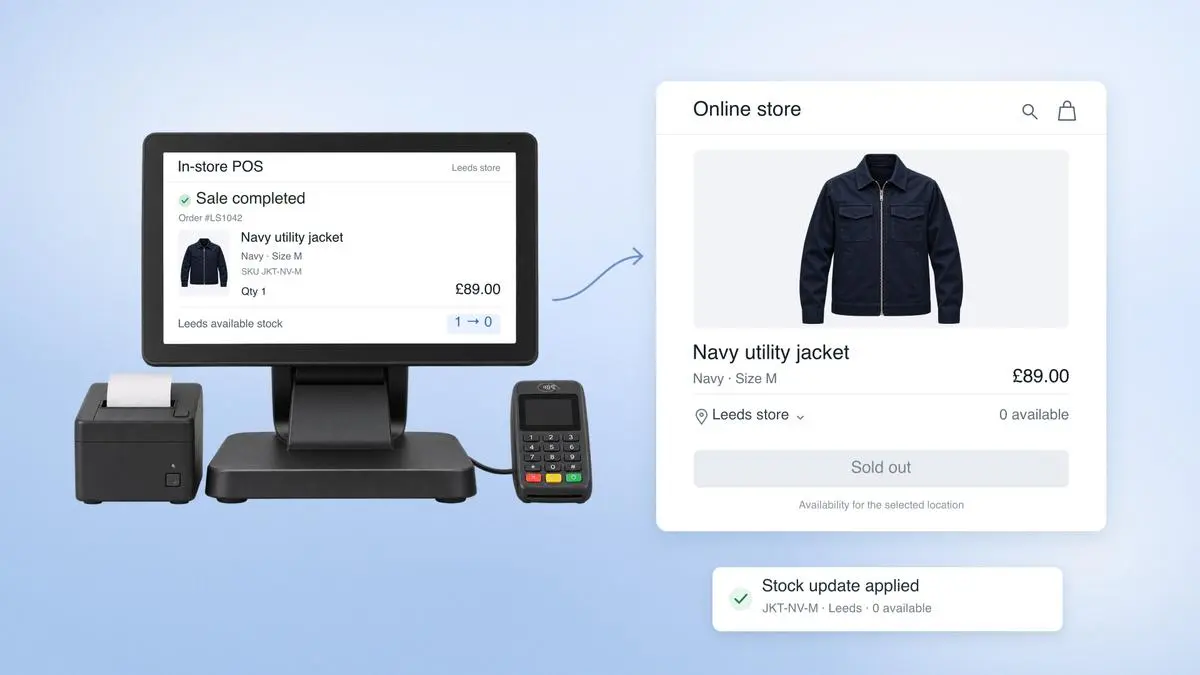
What happens when your website sells a product that has already sold out in store?
The customer places an order, makes the payment and receives a confirmation. Meanwhile, the last unit was sold at a till minutes earlier. The website still shows the unit as available, which leaves the retailer to source the product elsewhere or cancel the order.
POS ecommerce integration helps connect the retailer's point-of-sale systems with its online store. It allows information on stock, products, pricing, orders and returns to move between the two, so that a transaction in one channel is accounted for in the other.
According to the Office for National Statistics, online shopping accounted for 28.8% of retail sales in Great Britain in September 2026. With customers buying from both websites and physical stores, retailers need to know exactly what stock they have available to sell, regardless of where the purchase takes place.
This article explains how POS ecommerce integration works, how inventory is synchronised between stores and websites, and how to decide which system manages each type of data. It also covers how to handle failed updates and what retail operations, ecommerce and technology teams should consider when choosing or reviewing an integration.
POS ecommerce integration connects the till system in a retailer's stores with the online store, so products, prices, stock, orders, returns and customer records stay consistent across both channels. It can run through APIs and middleware between separate systems, or through one platform where the POS and the storefront share a backend.
The connection carries five kinds of data:
Products and prices: SKUs, variants, barcodes, descriptions, images and retail prices.
Stock by location: quantities for each store, warehouse and online allocation, plus transfers and adjustments.
Orders and returns: online and in-store orders, refunds and exchanges.
Customers and loyalty: contact details, purchase history and loyalty status.
Discounts: codes, automatic promotions and manual price changes made at the till.
Retailers use the term retail POS integration for this connection whether the other side is an ecommerce platform, an enterprise resource planning (ERP) system or an order management system (OMS). In practice a retailer may connect several of them, and the design choices in the rest of this guide apply to every link.
POS ecommerce integration allows a retailer's in-store and online systems to exchange information whenever a product is sold, returned or moved between locations. Each transaction needs to be recorded in the relevant systems so that stock levels, orders and other records remain accurate across both channels.
The process generally follows six steps:
A sale takes place: A customer purchases a product in store or through the website.
The transaction is recorded: The POS or ecommerce platform captures the order details, including the products, payment, customer information and fulfilment location.
The update is sent: The system sends the transaction details to the integration, usually through a webhook or message.
The data is checked and matched: The integration validates the information and matches product SKUs and location codes with the corresponding records in the receiving system.
Stock and order records are updated: The appropriate inventory record is adjusted, and the order information is passed to connected systems, such as the ERP, where required.
Records are reconciled: Periodic checks compare data across systems to identify missing updates or discrepancies that need correcting.
Returns work in a similar way. For example, if a customer buys a jacket online and returns it to a store, the POS should be able to retrieve the original order, process the refund and update inventory at the receiving location once the jacket is approved for resale.
The time taken to share the updates depend on how the integration is configured. There are two common approaches:
Event-driven integration: Each sale, return or stock change triggers an update as it happens. This is useful when stock is shared between stores and websites, particularly for products with limited availability.
Batch integration: Updates are collected and processed at scheduled intervals, such as every 15 minutes. This can work for less time-sensitive information, although stock figures may differ between channels until the next update.
Retailers can also use a combination of both approaches, with frequent updates for inventory and orders and scheduled transfers for other records. Periodic reconciliation remains important in either case, as it helps identify transactions that were delayed, missed or processed incorrectly.
Retailers connect the till to the website in one of three ways.
Approach | How it works | Suits | Watch points |
Native connectors between two products | A POS vendor and a commerce platform vendor publish a ready-made integration | Retailers on a supported pairing with standard processes | Fixed mapping rules and limited support for custom pricing, trade accounts or unusual returns |
Middleware or IPaaS | A separate integration platform sits between POS, commerce platform, ERP and OMS and carries events between them | Retailers with an ERP, several selling channels or custom rules | One more system to run and monitor, and the retailer owns the error handling |
One platform | POS and storefront run on the same backend and share one record of products, stock and orders | Retailers replacing or consolidating systems | A larger change project, and any ERP still needs its own connection |
Native connectors generally define which system is responsible for each type of data. For example, the POS may manage product and inventory records, sending stock availability from selected stores and warehouses to the website. In other setups, the back-office system manages products, pricing and inventory, while the POS sends back details of in-store sales, returns and stock adjustments. Both approaches can work, provided each system has a clearly defined role and the integration follows the same rules.
Another option is an omnichannel POS that shares the ecommerce platform's backend. Since stores and websites read the same records, there is less need to translate and synchronise data between separate systems. However, adopting this approach may involve replacing existing software, making it a more substantial project than connecting the systems already in use.
The right approach depends on the retailer's existing technology and operational requirements. A business running one POS and one ecommerce platform may find that a native connector meets its needs. A retailer managing an ERP, warehouse management system and several sales channels may benefit from middleware or a shared platform, which can coordinate data across these systems through one central connection in place of a link between every pair.
Inventory synchronisation keeps stock records updated across stores, warehouses and online channels. When a product sells at a till, the POS records the sale against that store's inventory and sends the change to the ecommerce system. The website then updates the quantity available for customers to purchase.
The process depends on three decisions: how stock is recorded across locations, how quantity changes are communicated and how systems check that their records match.
Track inventory by SKU and location
Each product needs a separate inventory record for every location where it is stocked. For example, a jacket may have five units available in Leeds, eight in Manchester and twelve at a warehouse. A sale in Leeds should reduce the stock at that store while the quantities held elsewhere stay the same.
Retailers must also decide which locations can fulfil online orders. Some may use warehouse stock exclusively, while others make inventory from selected stores available on the website.
Keeping these records separate allows retailers to see where stock is held and calculate online availability based on the locations eligible to fulfil an order. Relying on a single combined stock figure makes it harder to identify where an item is available and whether it can be supplied to the customer.
Send stock changes as adjustments
Suppose a store has 12 jackets available and sells one. The POS can report the transaction in two ways: as a reduction of one unit or as a new stock quantity of 11.
An adjustment of minus one can be applied to the current stock figure, even if another sale has taken place in the meantime. Sending a fixed quantity of 11 carries the risk that, if the receiving system has already recorded another transaction, applying that figure overwrites a more recent update.
Some ecommerce platforms prevent this through quantity checks. Before accepting an update, the platform verifies that the existing quantity matches the value expected by the sending system. If it has changed, the update is rejected and must be reviewed or retried using the latest information.
Integrations also need to recognise transactions that have already been processed, so a repeated message deducts the same stock only once.
Use live updates alongside regular stock checks
With event-driven POS inventory sync, inventory updates as sales, returns and stock movements take place. This helps retailers keep the stock shown online in line with what is available in stores.
However, a temporary connection failure or a delayed update can leave the two systems showing different quantities. To catch these discrepancies, retailers run scheduled reconciliation checks that compare inventory records across both systems.
For example, if the POS records eight jackets at a store but the ecommerce platform shows ten, the reconciliation process flags the two-unit difference. The team can then investigate the cause and correct the records according to the agreed rules for stock accuracy.
Retailers should establish how frequently these checks take place, how failed updates are retried and who is responsible for resolving discrepancies.
Stock physically held at a location and stock available for sale are separate figures. Items reserved for online orders, returns awaiting inspection and stock being transferred between locations all need to be accounted for when calculating availability.
Our guide to why store and online stock never match explores these situations in more detail.
The POS and ERP handle different parts of retail operations, so it makes sense for each to manage the information it deals with directly. The ERP usually maintains product records, supplier details, purchasing and costs, while the POS records transactions made in store.
The question becomes more complicated when both systems hold the same information, particularly inventory. A sale at the till, a delivery received at the warehouse and an online order can all affect stock availability. Retailers need to decide which system maintains the official stock count and how updates from other systems are applied.
A common division of responsibilities looks like this:
Data type | System responsibility | Role of other systems |
Product details, costs and supplier information | ERP or PIM | POS and website receive updates |
Retail prices and promotion | ERP or commerce platform | POS and website receive approved prices |
Store inventory | System responsible for stock counts and goods received | Other systems report stock movements |
Stock reservations and available-to-promise quantities | OMS or commerce platform | POS checks availability |
In-store sales and payments | POS | ERP and commerce platform receive transaction details |
Online orders | Ecommerce platform or OMS | POS and ERP receive order information |
Customer profiles and loyalty records | CRM or commerce platform | POS accesses and updates customer records |
Inventory shows why each data type needs a clear owner. Suppose a stocktake confirms that a store has 20 units of a product. That figure is recorded in the system responsible for inventory. When the POS reports a sale, the stock count should fall by one. If the POS instead sends a stock figure based on its own earlier count, it could overwrite changes made since the last update.
In a POS ERP integration, information generally flows both ways. The ERP supplies product details, supplier records and costs, while the POS sends back sales and returns for financial reporting and stock valuation. The exact division depends on how the retailer manages its systems and inventory.
For online orders, the OMS usually handles stock reservations and order routing. It checks availability across stores and warehouses, then determines where each order should be fulfilled.
For more on how this works, read our guide to retail order management.
When an integration fails, the POS and ecommerce platform can end up showing different stock levels, prices or order information. A product sold in-store may still appear available online, or an order may fail to reach the system responsible for fulfilling it.
The cause isn't always a complete outage. An update might arrive twice, reach the receiving system out of order or fail because the product identifiers don't match. Retailers need a way to detect these errors, recover missing information and correct affected records without disrupting store operations.
Failure | What happens | How to handle it |
Duplicate updates | The same sale is processed twice, reducing stock by two units instead of one | Identify duplicate messages using delivery IDs and use idempotency keys to prevent repeated transactions |
Missed updates | A product sold in-store continues to appear available online | Run scheduled checks to find transactions or stock changes that were never received |
Updates arriving out of order | An older stock update overwrites a newer one, or an update arrives before its related record exists | Check event versions and timestamps, and prevent outdated information from replacing newer records |
Product or price mismatch | A SKU cannot be matched between systems, or the POS and website display different prices | Review product identifiers and pricing rules before launch, and flag unmatched records for correction |
Connection failure | Stock and order updates stop moving between systems | Queue transactions during the outage, process them once the connection returns and check for discrepancies afterwards |
These safeguards are especially important for integrations that rely on webhooks. Even established ecommerce platforms do not guarantee that every webhook will arrive successfully or in the order it was generated. Their guidance generally recommends checking for duplicate deliveries, handling events that arrive out of sequence and periodically fetching updated records to catch anything that was missed.
Retries also need careful handling. Suppose the integration sends a stock adjustment but times out before receiving confirmation. Sending the request again could deduct the same unit twice. An idempotency key allows the receiving system to recognise a repeated request and avoid processing the transaction again.
Retailers should agree on how integration failures will be handled before the systems go live. The recovery process should cover five areas:
Monitoring and alerts: Decide which team receives failed-sync alerts, how quickly they should respond and when an issue needs to be escalated.
Continuity of trading: Establish how stores will operate if the connection goes down. Where the systems support it, transactions can be recorded locally and queued for synchronisation when service returns.
Recovery checks: Once the connection is restored, compare stock, orders and prices across systems to identify missing or incorrect updates.
Manual corrections: Assign responsibility for reviewing discrepancies, approving stock adjustments and keeping a record of the changes made.
Pre-launch testing: Test duplicate transactions, delayed messages, mismatched product records and connection failures to confirm that the integration recovers as expected.
A recovery process is only useful if store teams know what to do when something goes wrong. The procedures should explain who investigates an issue, which transactions can be processed during an outage and how the team confirms that records are accurate before normal synchronisation resumes.
Our EPOS migration checklist covers the testing and go-live checks retailers should complete before introducing a new system.
Following questions help a retailer compare vendors and review an existing setup:
Which system owns each data type, and is that written down?
Does stock sync by location, or only as one total?
Does the integration send adjustments or overwrite counts?
How are duplicates and out-of-order updates handled?
How often does reconciliation run, and who sees the exceptions?
What happens in stores during an outage?
How are returns linked to the original order across channels?
Who maintains the connector when either platform changes its API?
A reliable POS ecommerce integration starts with clear ownership of data, accurate stock updates across locations and a process for handling delays or failed transactions. Getting these details right helps retailers keep their stores and websites running with consistent information.
Fynd Store OS and the ecommerce storefront operate on the same backend, giving both channels access to shared inventory, orders and returns. Product catalogues, pricing, promotions and order management rules are configured through Fynd Commerce and applied across stores and online channels. Retailers can also connect their existing ERP or POS systems to Fynd, giving store teams visibility into stock across stores and warehouses.
Whether you're connecting existing systems or moving to a shared commerce platform, the priority is to keep stock and order information accurate wherever customers choose to shop.
See how Fynd POS keeps stock, orders and returns in step across your stores and online channels.
Amrita Bhambhani
Yes, retailers can connect existing systems through a native connector between two products, through middleware that links several systems, or by moving to a platform where the POS and storefront share one backend. The right route depends on the retailer's existing technology and how many systems need to exchange data.
A retailer with one POS and one ecommerce platform can often connect them directly through a native connector. An ERP joins the design when the retailer uses it for purchasing, costs or finance, and the integration then passes sales, returns and stock changes to it as well.
Event-driven updates suit products that sell quickly or exist in limited quantities, because each sale reaches the website as it happens. Batch updates at scheduled intervals suit less time-sensitive records. Retailers can combine both and run periodic reconciliation to catch any update that was delayed or missed.
POS ecommerce integration is the broader term, covering every way of connecting stores and online channels, including connectors and middleware between separate systems. Unified commerce usually refers to the shared-platform approach, where stores and websites read the same records.
Testing should cover duplicate transactions, delayed messages, mismatched product records and connection failures, and should confirm that stock, orders and prices reconcile afterwards. Our EPOS migration checklist covers the go-live checks in more detail.
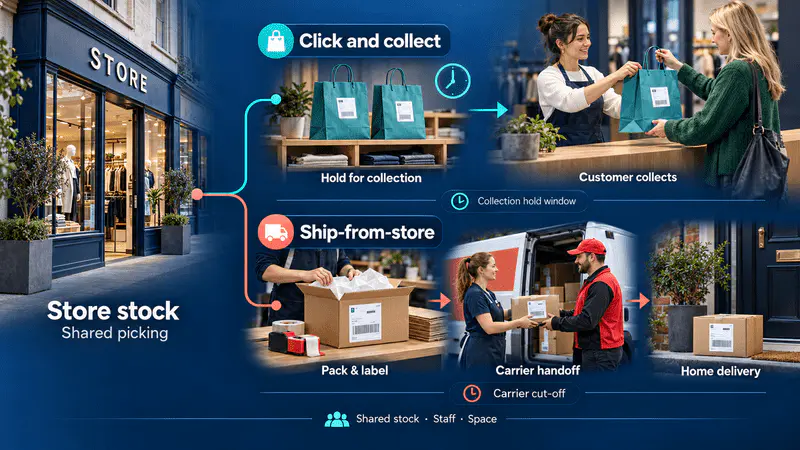
Compare click and collect with ship-from-store to understand the staffing, inventory, space and cost considerations of each model.

Learn how retailers can move from reactive to autonomous commerce by giving AI systems clear objectives, permissions and measurable responsibilities.
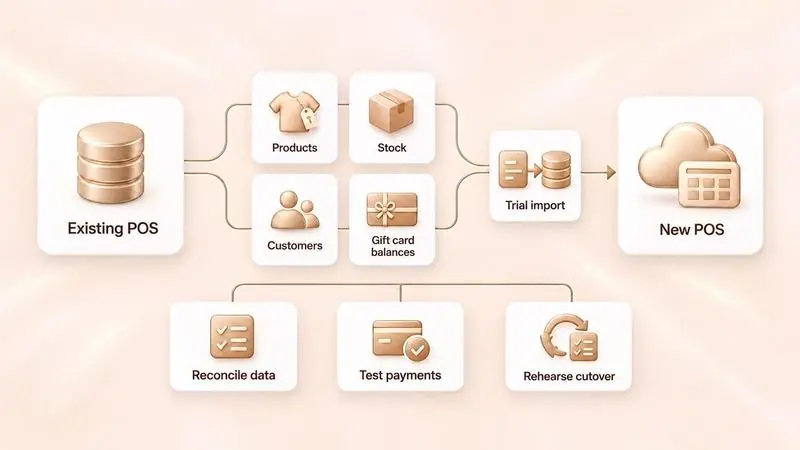
This POS migration checklist explains how retailers can prepare their data, test store systems, train staff and plan cutover and rollback before go-live.
Fill out the form
Share your contact information to get started
Speak to an expert
A member of our sales team will get in touch with you